Premia
Premia Teams
The app for your team

Your team, every location, one app.

Premia Teams is the app for the team of any business with one or more locations: communication, routines with evidence, incidents, shifts, training and recognition, with a console for the owner and the managers.

Premia Teams · premia.vip/en/teamsGreenfield AI Tech
A café counter with a tablet on it and a barista working in the background
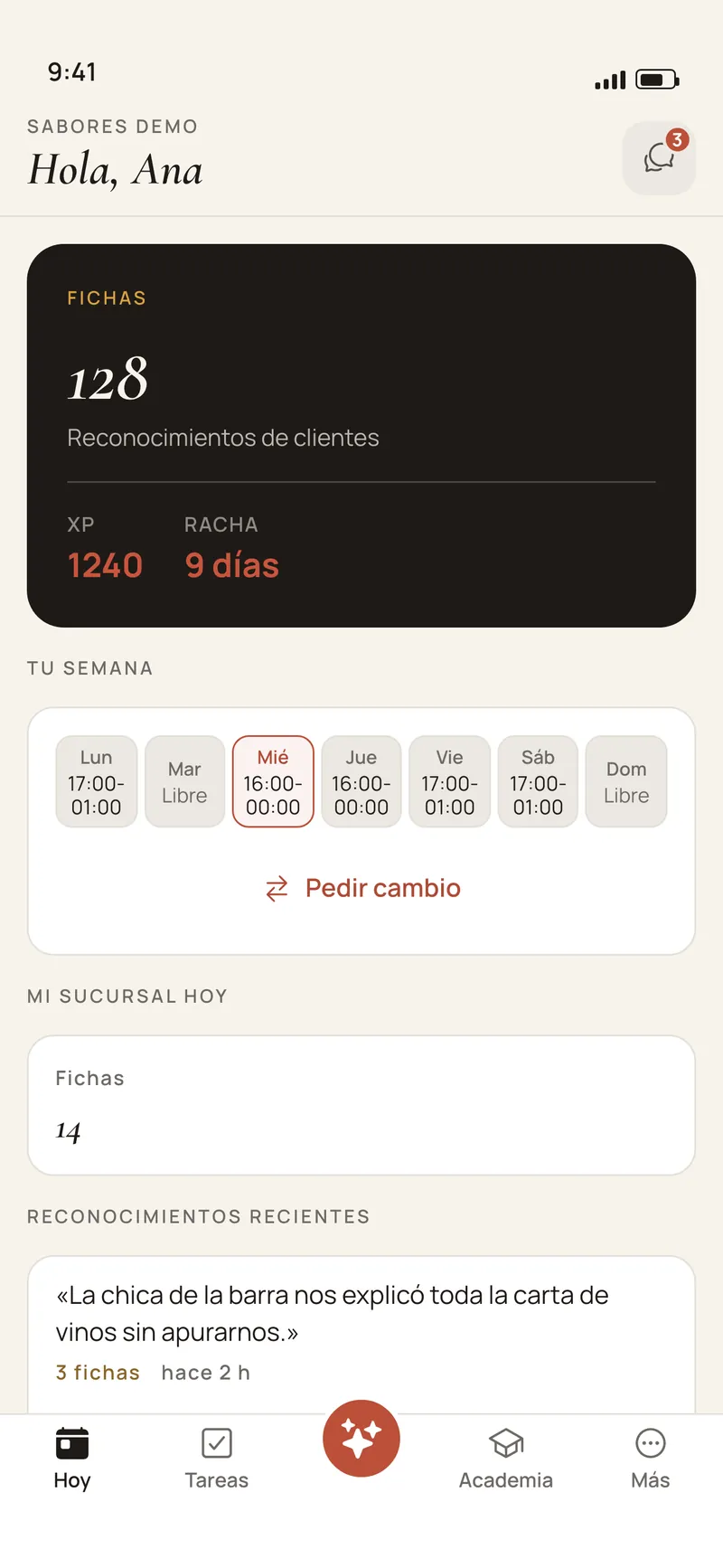
The Premia Teams app Today screen, staff view: their tokens, experience and streak, their week of shifts with the button to ask for a swap, and recent recognitions
Today
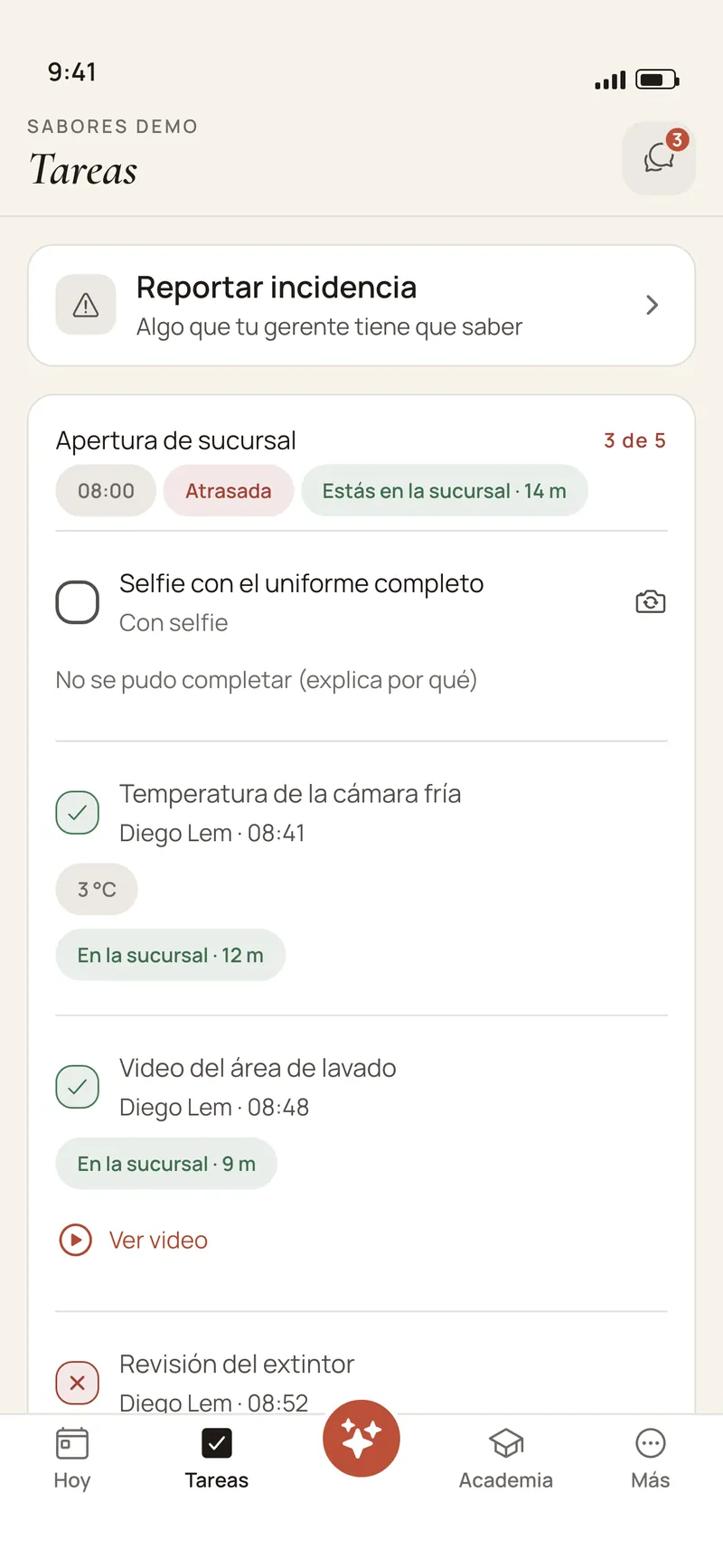
A list for the day in the Premia Teams app: a uniform selfie still to take, the walk-in temperature recorded, a video of the washing area, the location confirmed at the branch, and the «No se pudo completar» (could not be done) option
Tasks with evidence
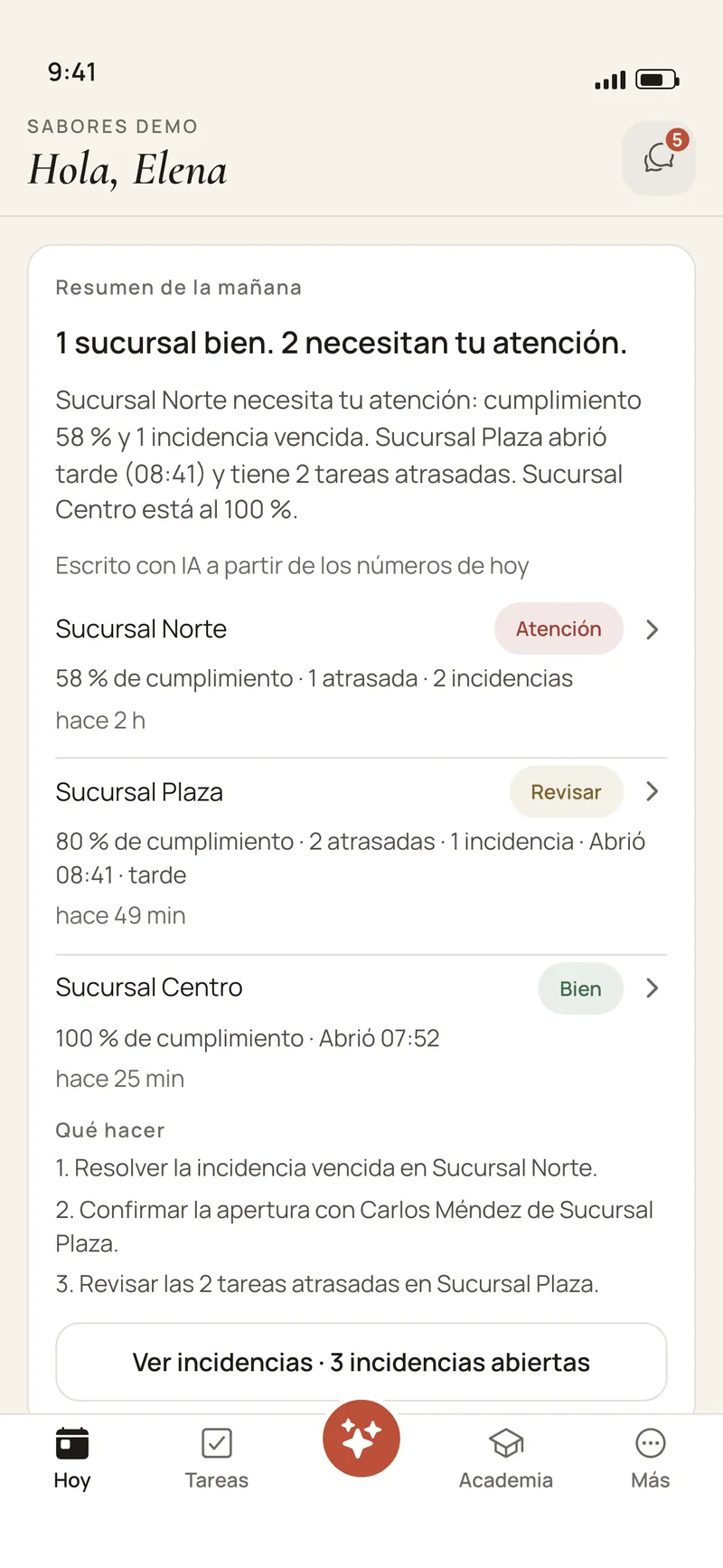
Owner view in the Premia Teams app: the AI-written morning summary, the status of three locations with their completion, overdue routines and incidents, and what to do
Morning summary

Premia Teams app screens with sample data (Spanish UI).

How it is supervised today

Operations live in a WhatsApp group and in the manager’s memory.

Photos with no context

The proof that something was cleaned lands in a group with forty other messages, with no time, no location and no name.

Paper checklists

Signed every morning and read by nobody until something goes wrong.

Training by one person

Whoever joins learns from whoever is on that day. When your best manager leaves, what they knew leaves too.

Locations you cannot see

To know how each location opened you call each manager, one by one.

What Premia Teams is

Four things your team uses every day.

An iPhone and Android app for the whole team and a web console for the owner and the managers, on the same data.

Communication

Chat and announcements

Channels per location and per area, groups, direct messages and announcements with read confirmation.

Operations

Routines with evidence

Daily lists per location and station, with a photo, a selfie, a video, a number or the location; incidents and shifts.

Training

Academy and onboarding

Short lessons written from your manuals, the first-days path and an assistant that answers from your documents.

Recognition

Experience and badges

Lessons, routines and recognitions count; the monthly table shows who holds the operation together.

One app for everyone

The owner, the manager and the staff, in the same app.

Staff

Their day

Their shifts for the week. · Today’s tasks with their evidence. · Announcements and chats. · Their lessons and progress.

Manager

Their location

What is left and what is overdue. · The open incidents. · Approves shift swaps. · Posts announcements.

Owner

Every location

The morning summary. · Completion per location. · The web console to decide. · People, stations and permissions.

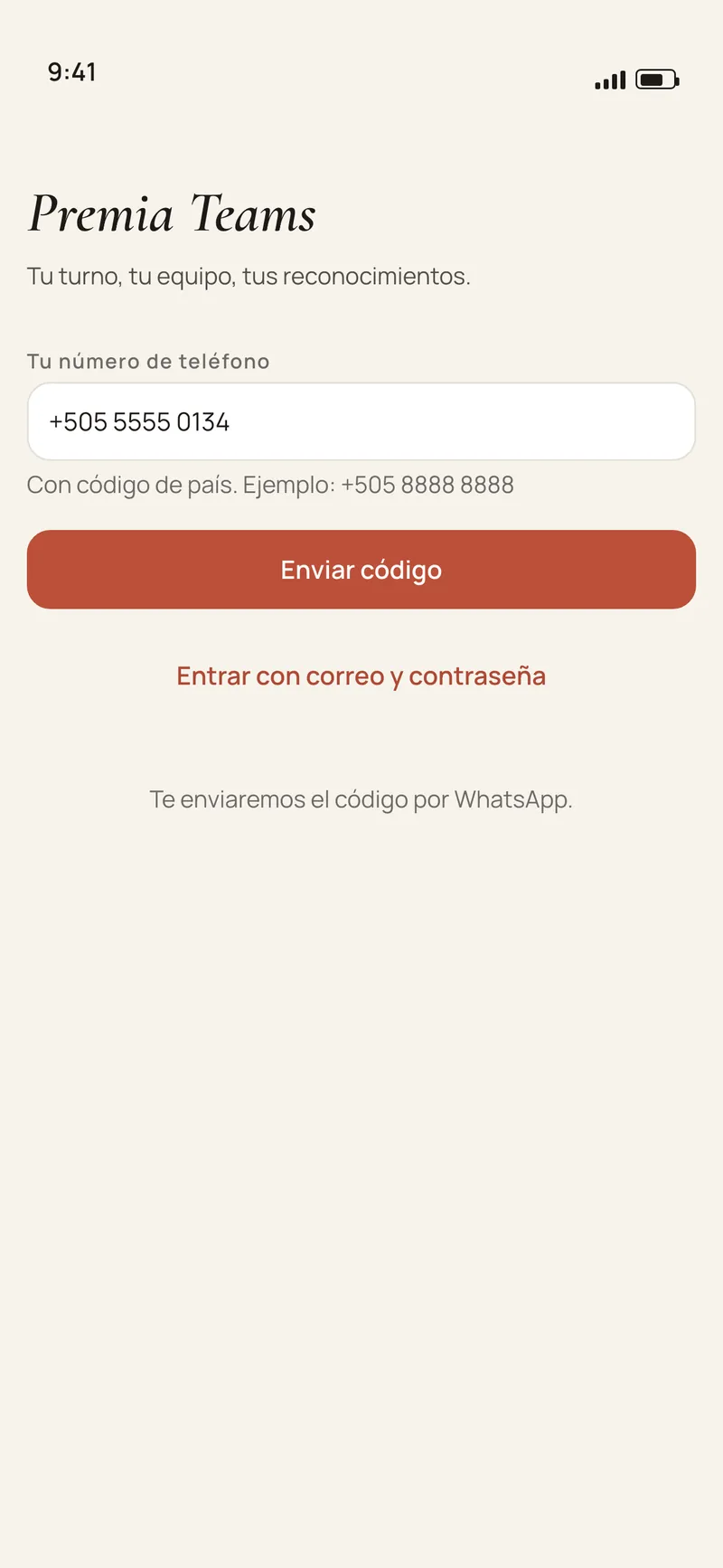
Sign-in is the phone number and a code by WhatsApp or SMS. No passwords and no open sign-up: the manager adds each person. No hardware: everyone uses their own phone.

The Premia Teams app sign-in screen: you sign in with your phone number and a code, no password
Sign in
The Premia Teams app Today screen, staff view: their tokens, experience and streak, their week of shifts with the button to ask for a swap, and recent recognitions
Today
Owner view in the Premia Teams app: the AI-written morning summary, the status of three locations with their completion, overdue routines and incidents, and what to do
Morning summary

Premia Teams app screens with sample data (Spanish UI).

A restaurant floor at night, full, with a server walking between the tables

Part I

Communication and operations.

A place that belongs to the business for talking to the team, and each location’s list for the day with the proof it got done.

ICommunication

The team talks in a place that belongs to the business.

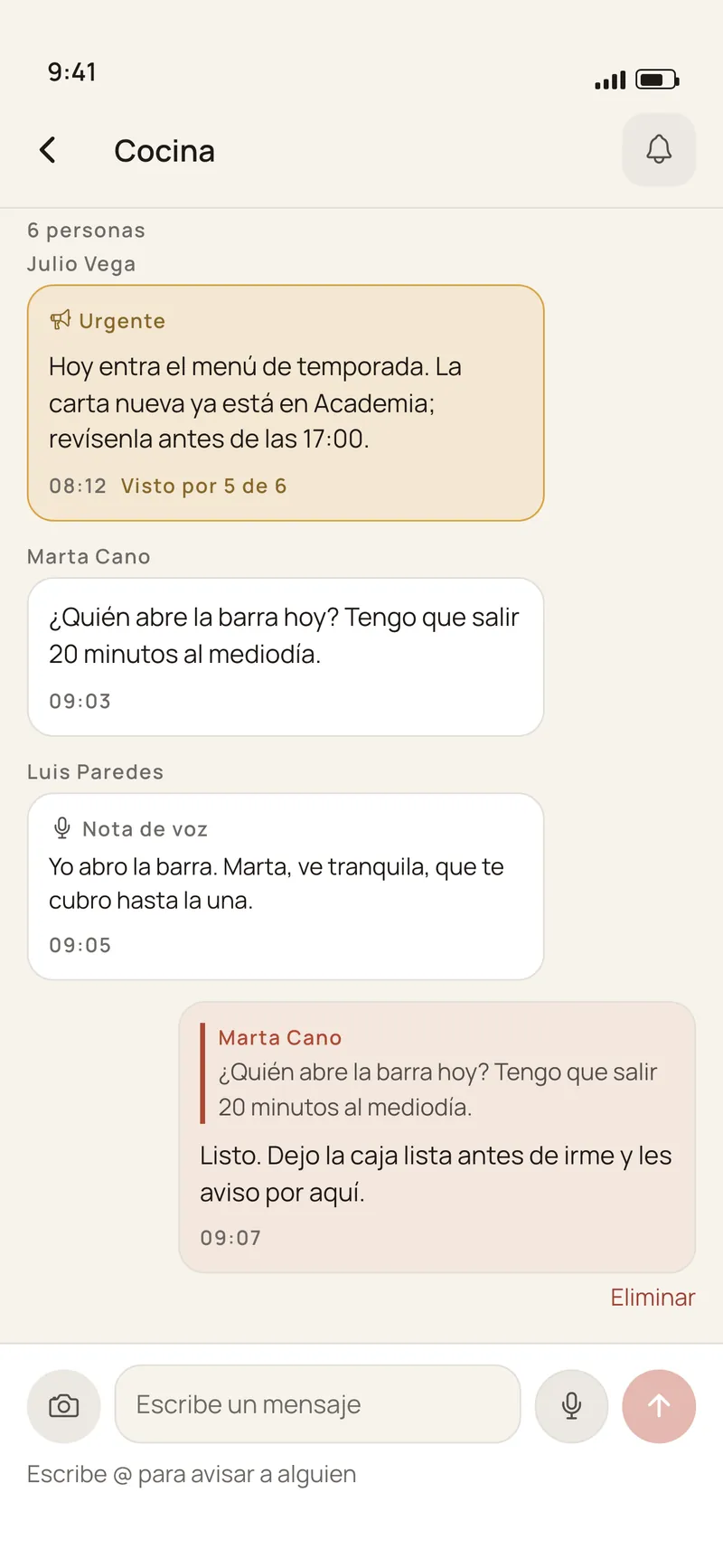
  • Chats per location, per area and in groups, plus direct messages. Voice notes arrive transcribed too.
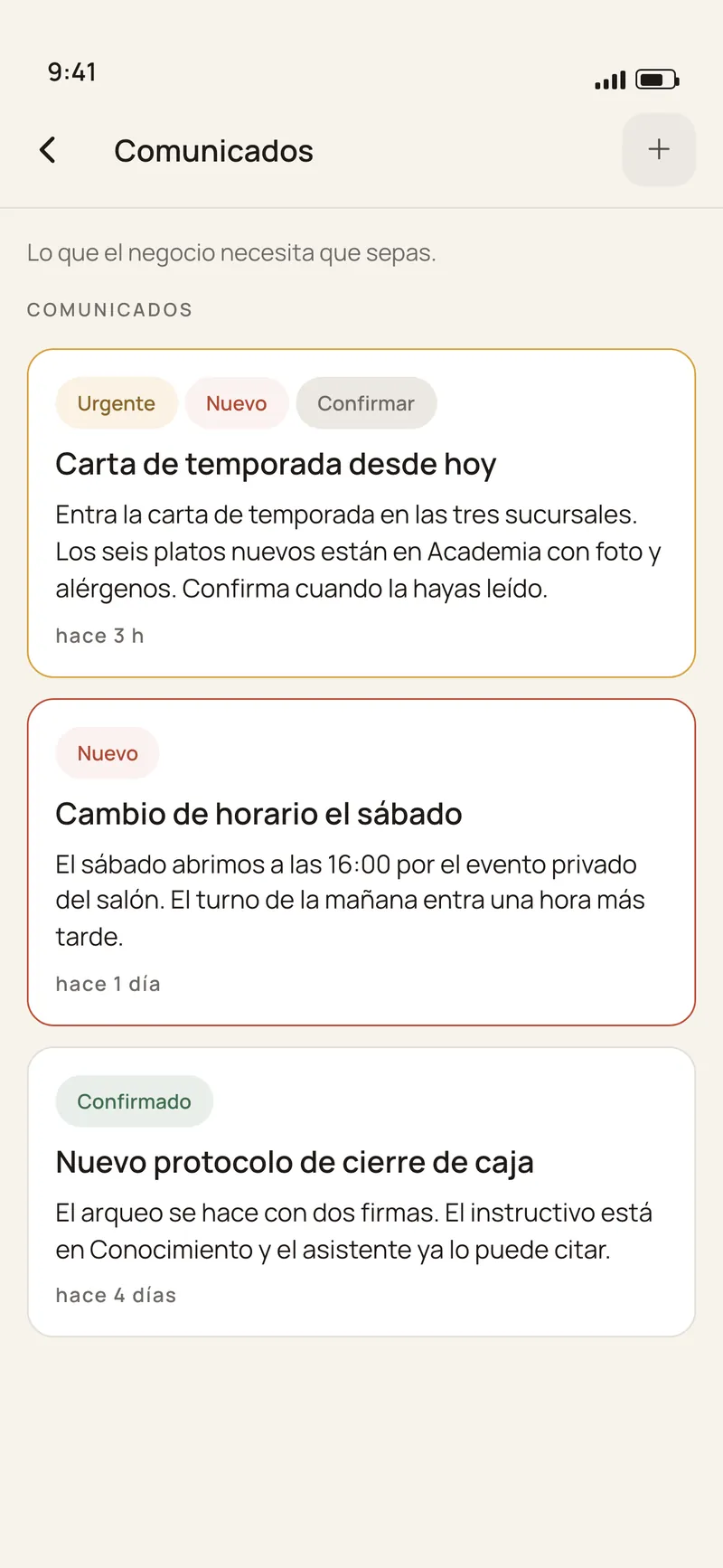
  • Announcements with confirmation. Management posts once and sees who read it. Urgent posts arrive even on a muted channel.
  • Quiet hours. Each person decides when they get no notifications outside their shift.
  • The history stays with the business when a person leaves, instead of living on personal phones.
The Premia Teams app chats screen: location channels, per-area channels and groups
Chats
The Premia Teams app announcements screen: posts from management with read confirmation
Announcements

Premia Teams app screens with sample data (Spanish UI).

IOperations

Routines that get done with evidence.

Every location and every station has its list for the day. Each line asks for the proof it needs.

  • A photo, a selfie or a 15-second video for what can be seen: a clean kitchen, a finished display, a room ready for the guest.
  • A number with its range for what gets measured: a temperature, the till amount. Out of range is flagged on the spot.
  • Really at the location. A routine can ask for the location when a line is ticked: one reading, at that moment, never in the background.
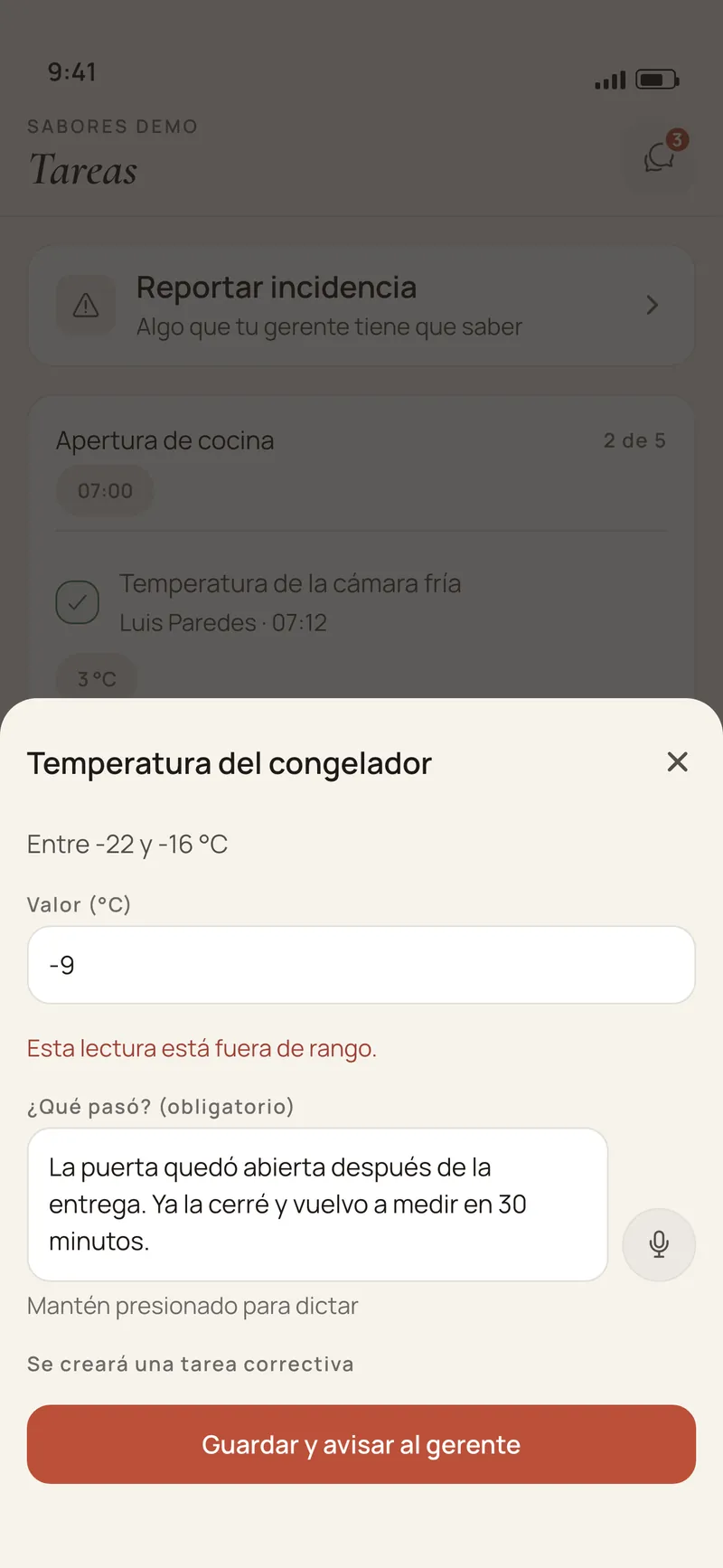
  • «¿Qué pasó?» (what happened?) If a line could not be done, the person says why and an incident opens.
  • List for the day
  • Evidence
  • What happened?
  • Incident
  • Resolved
A list for the day in the Premia Teams app: a uniform selfie still to take, the walk-in temperature recorded, a video of the washing area, the location confirmed at the branch, and the «No se pudo completar» (could not be done) option
Tasks with evidence
An out-of-range reading in the Premia Teams app: the freezer reads -9 °C against a -22 to -16 °C range, the app asks «¿Qué pasó?» (what happened?) and says a corrective task will be created
«¿Qué pasó?» (what happened?)

Premia Teams app screens with sample data (Spanish UI).

IIncidents and supervision

Every location, before lunch.

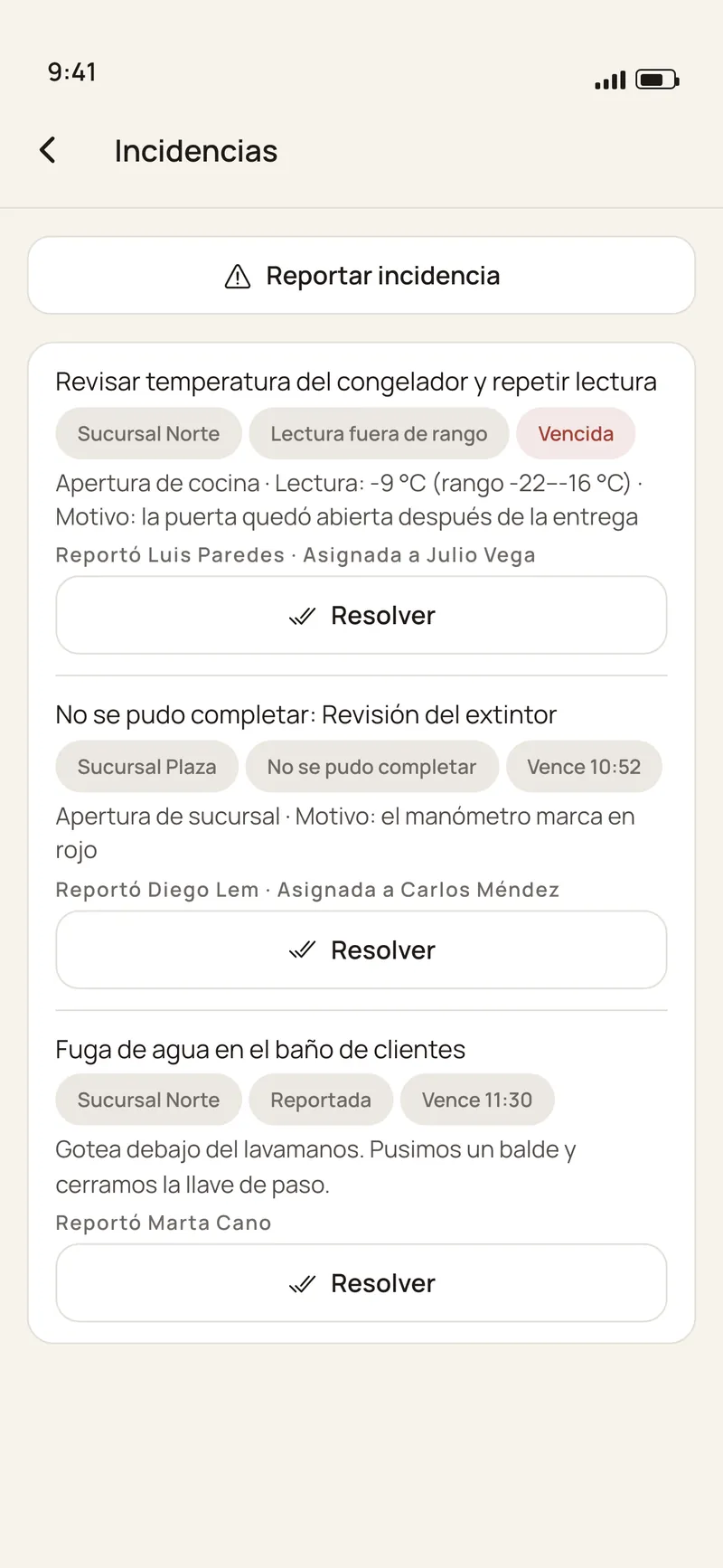
  • Incidents with a deadline. A reading out of range, a line that could not be done or a problem reported from the floor, with a photo. They stay open until somebody resolves them with a note.
  • Supervision per location. Completion, overdue routines and incidents for every location in the console. A manager sees theirs; the owner sees all.
  • The morning summary. Every day between 9 and 12, your local time, an AI-written summary reaches the owner and each manager. It can only cite locations and figures that are in your data; if it fails that check, a summary built without AI is sent instead.
The Premia Teams app incidents screen: an overdue out-of-range reading, a line that could not be done and a leak reported from the floor, each with its location, deadline and assignee
Incidents
Owner view in the Premia Teams app: the AI-written morning summary, the status of three locations with their completion, overdue routines and incidents, and what to do
Morning summary

Premia Teams app screens with sample data (Spanish UI).

IShifts

One published week, the same for everyone.

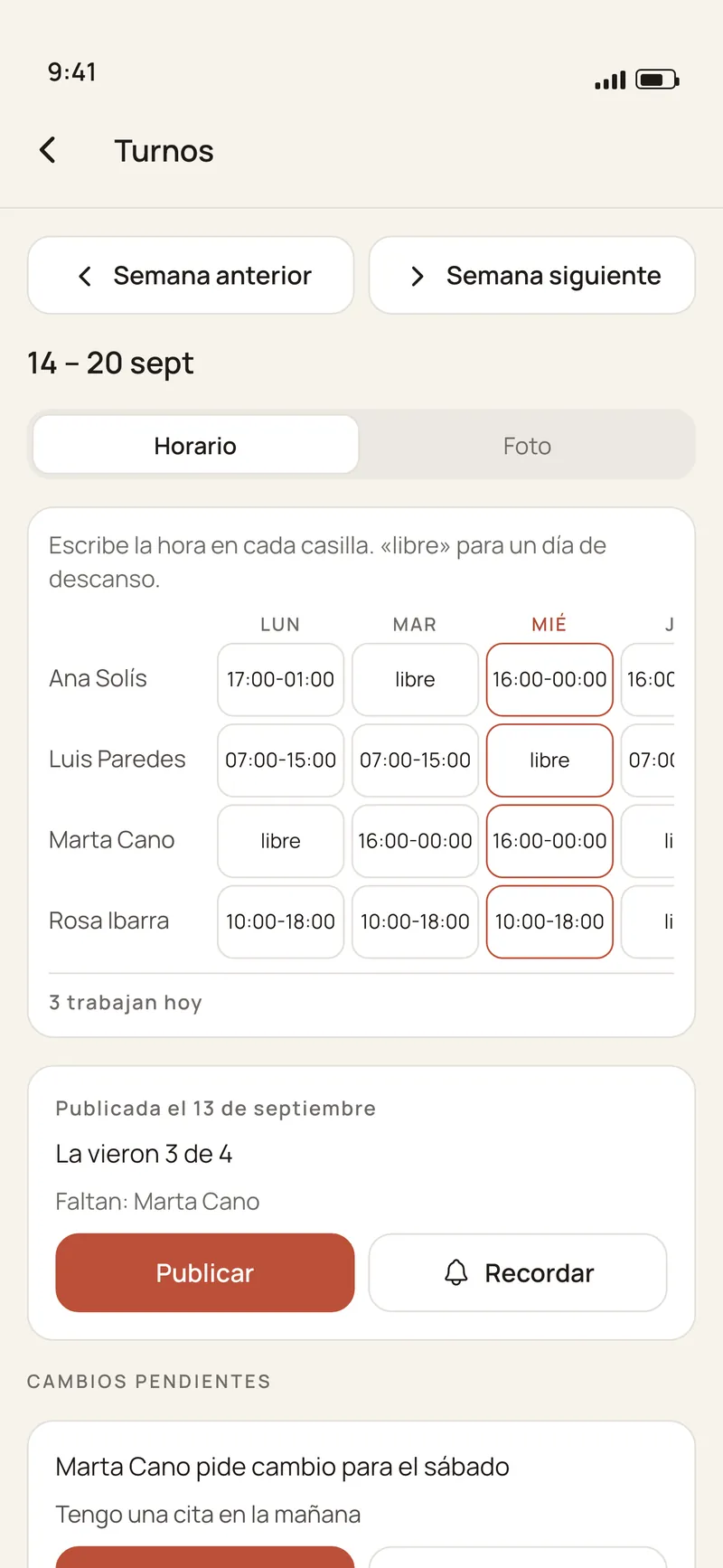
  • The manager publishes the week for their location once, and each person sees theirs in the app.
  • Swaps in one place. Whoever needs to change a shift asks in the app and a manager at the location approves it.
  • No time clock. Premia Teams does not clock anyone in or compute payroll: it organises the week, it does not police anybody.
The Premia Teams app Shifts screen, manager view: the week’s schedule, who has seen it, and a swap request to approve or reject
Shifts

Premia Teams app screen with sample data (Spanish UI).

A barista pulling a coffee at the espresso machine, next to the pastry case

Part II

Training and recognition.

What your best manager knows, in short lessons for the whole team; and good work, where everyone can see it.

IITraining

What your best manager knows, for the whole team.

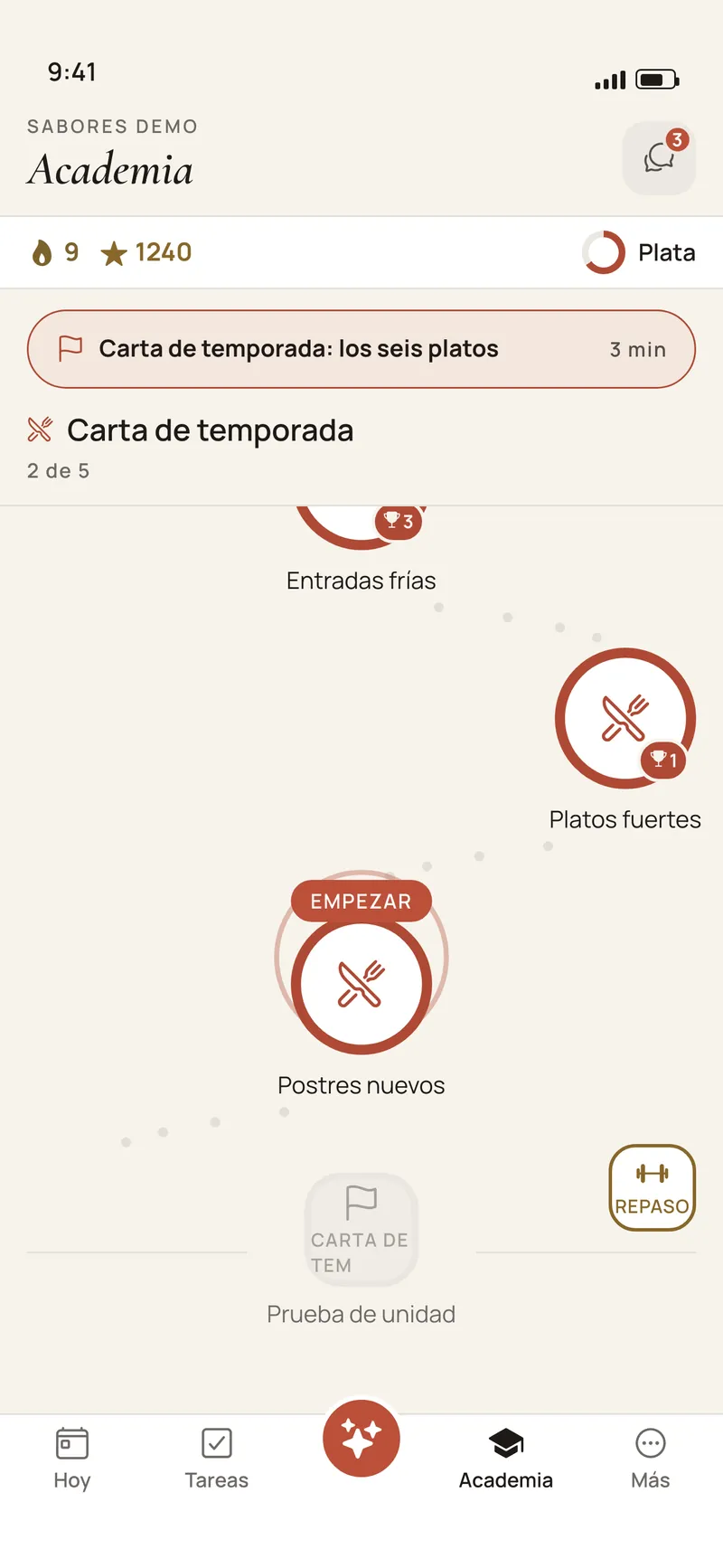
  • Academy. Lessons of a few minutes that Premia writes with AI from your manuals, your procedures and, if you have one, your menu. No question reaches the team until you approve it.
  • First-days onboarding. A path of steps for each new hire’s first week, with a buddy to walk them through it.
  • An assistant that knows your manuals. It answers by text or by voice from your documents and cites where the answer comes from. If it does not know, it says so.
  • Streaks, levels and badges so three minutes a day become a habit.
The Premia Teams app Academy screen: the path of short lessons, with streak and level
Academy

Premia Teams app screen with sample data (Spanish UI).

IIRecognition

Good work gets seen.

Experience adds up from what people already do in the app, and progress is visible to their team.

a

Experience

Lessons, reviews, routines, onboarding and recognitions all count, with anti-gaming rules.

b

Badges and a monthly table

Per location, to celebrate the people who hold the operation together.

c

If you already use Premia with your guests

The recognition a guest leaves reaches the person who served them, in their app.

A spa treatment room made ready, with a lit candle and folded towels

Part III

For your business.

Stations and routines for restaurants, hotels, salons, stores and service companies, with permissions per location.

IIIBy sector

For any business with a team that serves.

A restaurant dining room at night, with copper pendants, white-clothed tables and lit candlesRestaurants, cafés and bars

Kitchen, floor and bar

Routines in the library

  • Kitchen opening
  • Temperatures
  • Bar
  • Close and till

Stations

Kitchen · Server · Bartender · Cashier

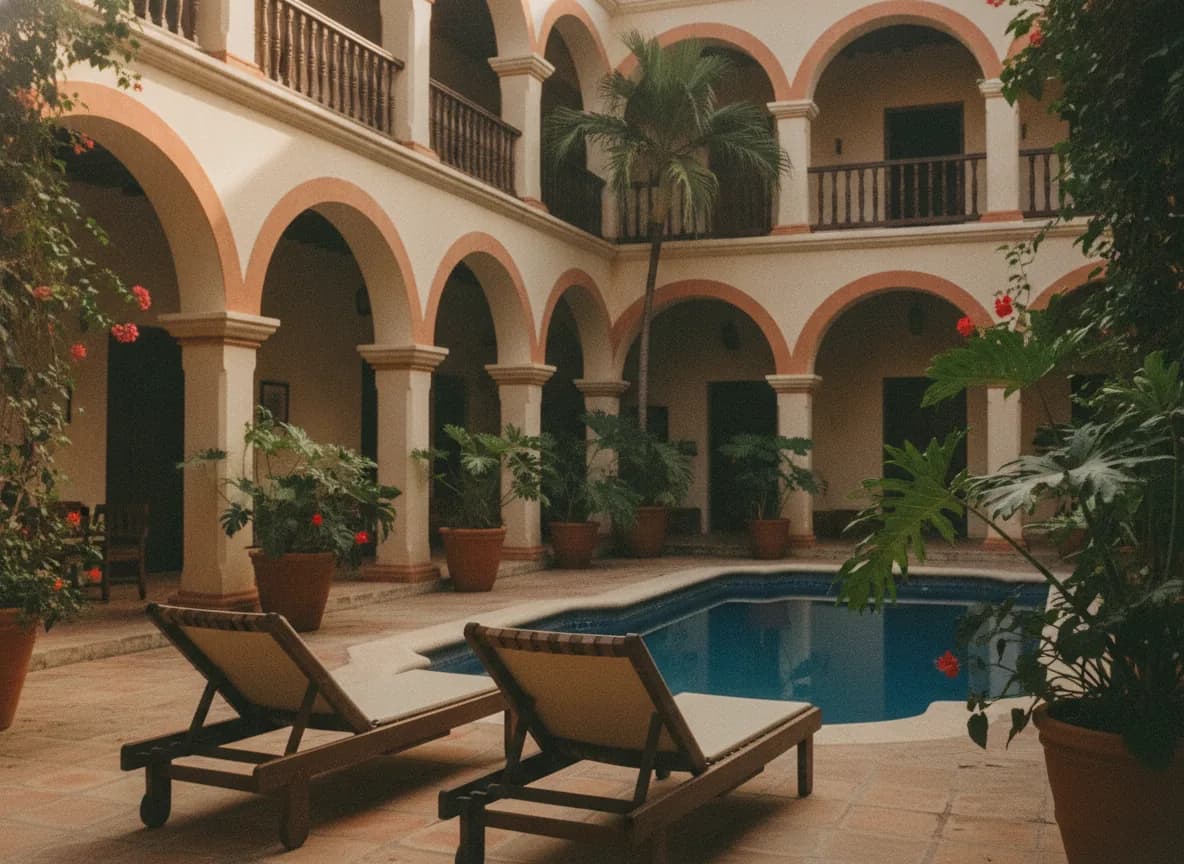
A colonial hotel courtyard with arches, bougainvillea, loungers and a small poolHotels

Rooms and front desk

Routines in the library

  • Room check
  • Front desk opening
  • Common areas
  • Pool

Stations

Housekeeping · Front desk · Bellhop · Concierge

A client at the mirror of a bright salon, with hanging plants and the stylist beside herSalons and spas

Salon and service

Routines in the library

  • Salon opening
  • Tool sterilisation
  • Salon close and till
  • Product stock count

Stations

Stylist · Colorist · Manicurist · Front desk

Stores

Sales floor, till and stockroom

Routines in the library

  • Store opening
  • Till close and reconciliation
  • Displays and windows
  • Weekly store stock count

Stations

Sales associate · Cashier · Stockroom · Floor supervisor · Visual merchandising

Service companies

Cleaning, maintenance and field technicians

Routines in the library

  • Vehicle and equipment checklist
  • Safety and PPE
  • Area cleaning
  • Service handover

Stations

Technician · Cleaning · Supervisor · Delivery

The library routines are a starting point: activate them, change them or write your own. The stations and the lessons are yours too.

IIISeveral locations, clear permissions

Everyone sees what is theirs.

Owner · administrationevery location · console and appLocation 1ManagerStaffby stationLocation 2ManagerStaffby stationLocation 3ManagerStaffby station
  • A manager sees only their locations. With none assigned they see none: the permission fails closed.
  • Stations. Each person has a station —kitchen, till, front desk, stylist, housekeeping, sales associate, technician— and routines reach the people they are for.
  • The same routines at every location, or a different one for the location that works differently.
  • The app and the console read the same data: what gets ticked on the floor is what the owner sees.
A seafront terrace at sunset, with string lights and boats in the background

Part IV

Getting started.

No hardware: everyone uses their own phone. You start with one location and three routines.
IVHow we start

No hardware and no blank page.

A demo with your operationWe learn how many locations you have, which stations and what gets checked every day.
Locations and peopleYou add your locations and each person with their number and station.
First routinesActivate routines from the library, start blank, or upload a photo of your paper checklist and Premia turns it into a draft you review.
Manuals and the AcademyUpload your procedures; review and approve the first lessons before they reach the team.

What it does not do today

  • It does not clock people in or compute payroll, paid hours or tips.
  • It does not work offline: the app needs internet.
  • It does not build the schedule for you: shifts are the week you publish.
  • The AI publishes nothing on its own.

IVPricing

Per location, with unlimited staff.

Premia Teams

US$59/mo per location · Latin America

US$99/mo per location in the United States

  • Unlimited staff.
  • No one-time setup fee.
  • You do not need to use Premia with your guests.
  • App for the whole team and web console.

If you already use Premia

+US$40/mo per brand · Latin America

+US$120/mo per brand in the United States

  • Added as a module, covering every location of the brand.
  • From the second brand on, 50%.
  • Billed outside Todo incluido.
  • Your guests’ recognition reaches your team.

Prices in US dollars, per month. All Premia pricing: premia.vip/en/pricing

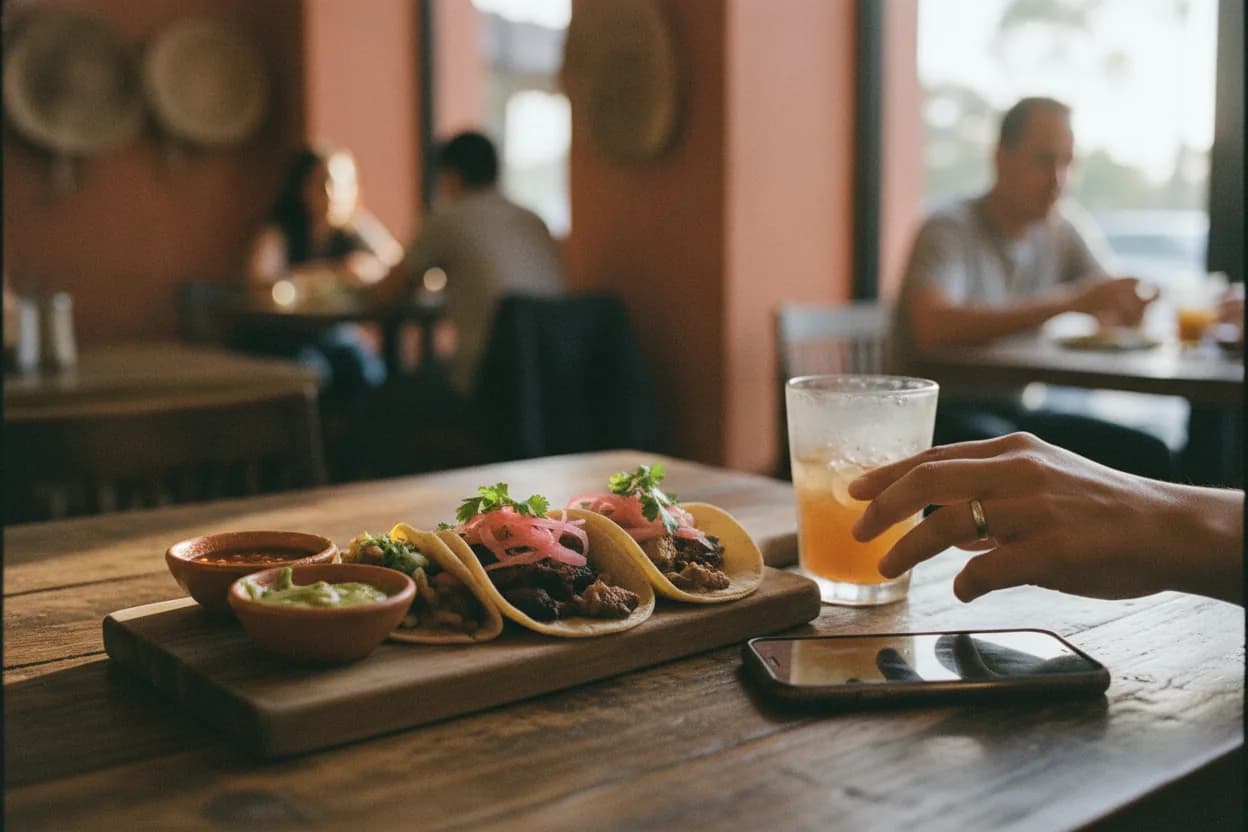
A wooden table with tacos and a drink, in a restaurant lit by the afternoon

Next steps

Start with one location.

Pick the first locationThe one that is hardest to supervise today.
Three routines and one announcementOpening, closing and the one that today gets checked by a photo in the group.
Bring the team inEach person signs in with their number, with nothing else to install.
Review it togetherWhat got done, which incidents came up and what the morning summary says.

What you would have

  • Evidence with a time, a location and a name, instead of loose photos.
  • Incidents that do not close themselves when the shift ends.
  • A summary of every location each morning.
  • Training that does not depend on who is on that day.
PremiaTeams

Premia Teams is a product of Greenfield AI Tech · premia.vip/en/teams