
Feature · New
Appointments
Premia Citas is the per-professional calendar for salons, spas, massage places and service businesses: reception, your online page and Mia on WhatsApp all book into the same calendar, with no overlaps. Mark an appointment “Attended” and the visit is credited to your loyalty program. Included in the membership for these businesses, from US$79 per brand per month.
Included for salons, spas and services
How it works
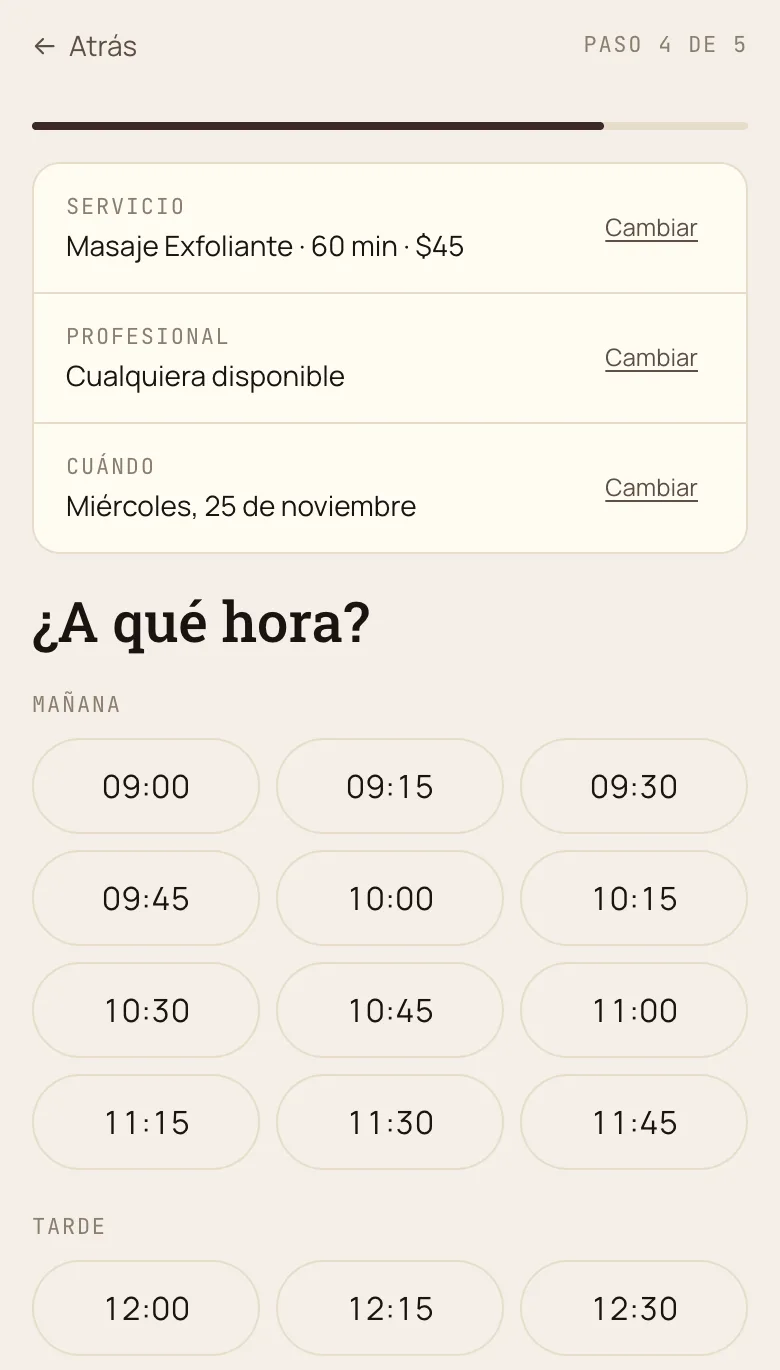
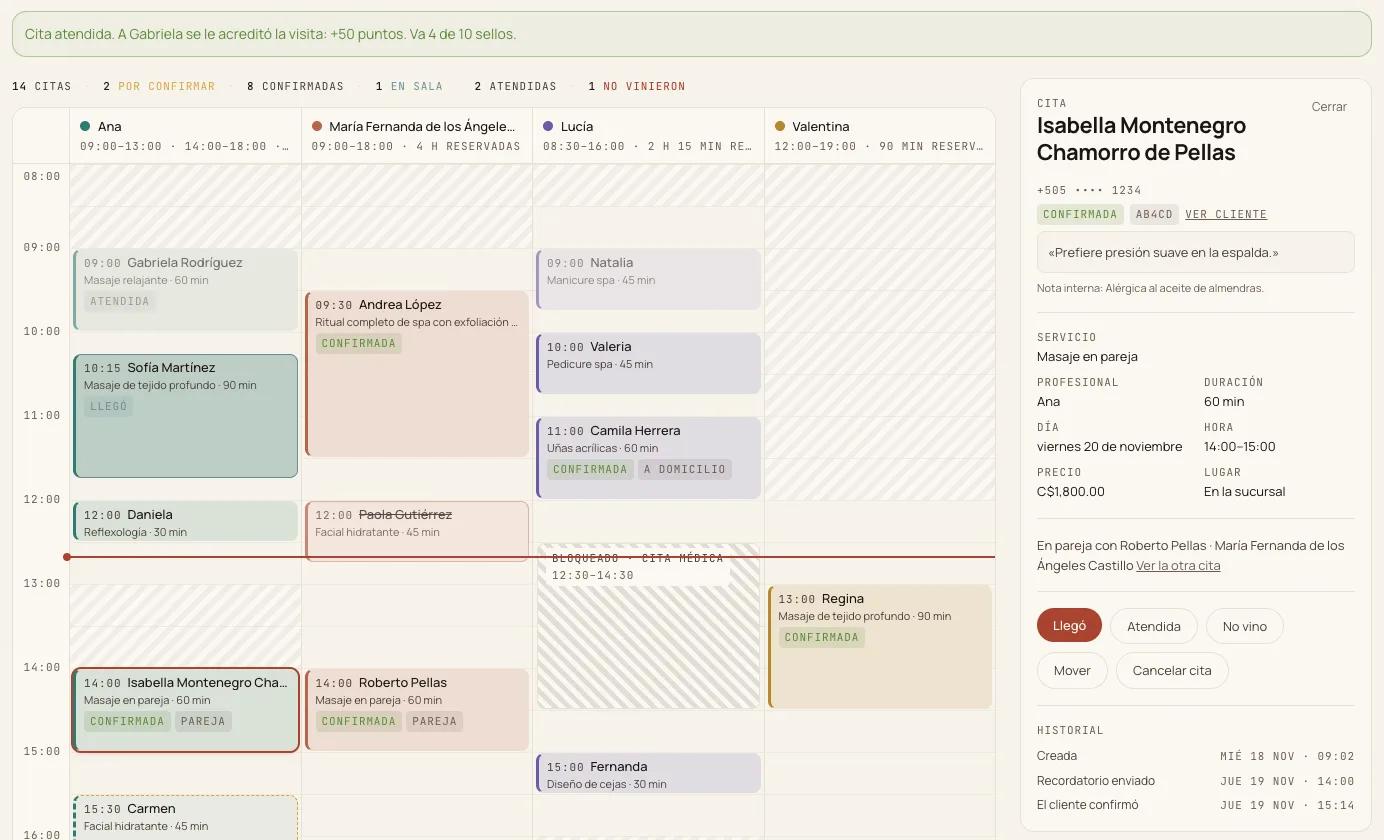
Reception books a person for a service: the length comes from the service, each professional has their own hours and days off, your rooms or beds set how many clients you see at once, and the calendar will not let two appointments overlap. Clients also book on their own from your Premia page — service, professional or “anyone”, day and time, and a WhatsApp code to confirm — for one person or for two, and they can move or cancel from their own link up to two hours before. Mia, Premia’s assistant, books, moves and cancels on WhatsApp. The confirmation and the reminder go out on WhatsApp, and the client replies to confirm or cancel. When you mark the appointment “Attended”, the visit is credited to your loyalty program on its own — points or a stamp, with no QR and no receipt — and each professional sees their day in the Premia Teams app, under “My appointments”.
- Booked
- Confirmation
- Reminder
- “Attended”
- Visit credited
What it does NOT do
The limits, said before you ask. A module that promises too much falls apart in the first week.
- It takes no payment: no online payment, no deposit, no card on file. Premia does not process payments; your client pays you at your place, as always.
- The calendar is shown by day, one column per professional; there is no week view yet.
- One appointment is one service: several services cannot yet be booked as a single appointment.
- It does not sell packages or gift cards.
- Client notices go out on WhatsApp, not by SMS.
What it costs
Included for salons, spas and services
For salons, spas, massage places and small service businesses, Appointments comes with your Premia membership at no extra cost. From US$79 per brand per month in Latin America and US$250 in the United States.
See the full price cardQuestions
- How does a client book without calling?
- From your Premia page: they pick the service, the professional or “anyone”, the day and the time, and confirm with a code that reaches them on WhatsApp. With “Two of us” they book for two people at once. Or they message Mia on WhatsApp, and she books the appointment in the same calendar your reception uses.
- What if the client needs to change the time?
- From their appointment link they move or cancel it up to two hours before, and they can also ask Mia. They reply CONFIRM or CANCEL to the reminder. Inside those two hours the change goes through your team: they message or call you.
- What do appointments cost?
- For salons, spas, massage places and small service businesses, Appointments comes with your Premia membership: it is not a separate module. The membership starts at US$79 per brand per month in Latin America and US$250 in the United States.
- Can I bring my clients and appointments from the system I use today?
- Yes. You import your clients and your upcoming appointments from a CSV or Excel file from your previous system. If the file has a notes column — allergies, preferences — it becomes each client’s private note, which only your team sees.
- How does each professional see their day?
- In the Premia Teams app, under “My appointments”: their appointments for the day, with the service and the client. You see each professional’s commissions in a report in your panel.
The other features
The rest of the platform, on the same customer.
- Loyalty programPoints from the receipt, tiers, stamps, rewards, referrals and a card in Apple and Google Wallet.
- Digital menu with QRA public menu with photos, the story behind each dish, time-based prices and a QR per venue or per dish.
- Concierge on WhatsApp and the appAn assistant that answers, shows the menu, books a table, takes the order at the table, and escalates to your team.
- ReservationsThe customer asks for a table in chat, your team accepts or declines, and the reminder goes out on its own.
- Order at the tableA QR per table: the customer orders from their phone, the tablet receives it with the table, and points arrive with no receipt photo.
- Premia Live · La CabinaFor bars: song requests, screen shout-outs, a live queue and karaoke mode, charged in points or to the tab.
- Premia DeliveryThe operations software for delivery companies: dispatch, verified riders, live tracking and per-zone fees.
- Thanks from your customersThe customer recognizes whoever served them with a Premia Token; it lands in an inbox with per-role analytics.
- Premia TeamsYour team's app: shifts, checklists, announcements, an assistant that answers from your own manuals, and three-minute lessons built from your manuals (and your menu, if you use Premia).
The next step
Try it with your own menu
Say “hi” to the live demo and see how it feels from the customer’s side, or book thirty minutes about your business: your menu, your rewards, your numbers.
WhatsApp +505 7791 2000 · hello@premia.vip