Premia Teams · for owners with a team in one or more locations

Your team, every location, one app.

Premia Teams is the app for the team of a business with one or more locations: chat and announcements, routines with evidence, incidents, shifts, training and recognition, with a web console for the owner and the managers. It works for restaurants, hotels, salons, stores and service companies. It costs US$59 per location per month in Latin America and US$99 in the United States, with unlimited staff.

US$59 per location per month · US$99 in the US · unlimited staff

iPhone and Android app · web console · Spanish and English
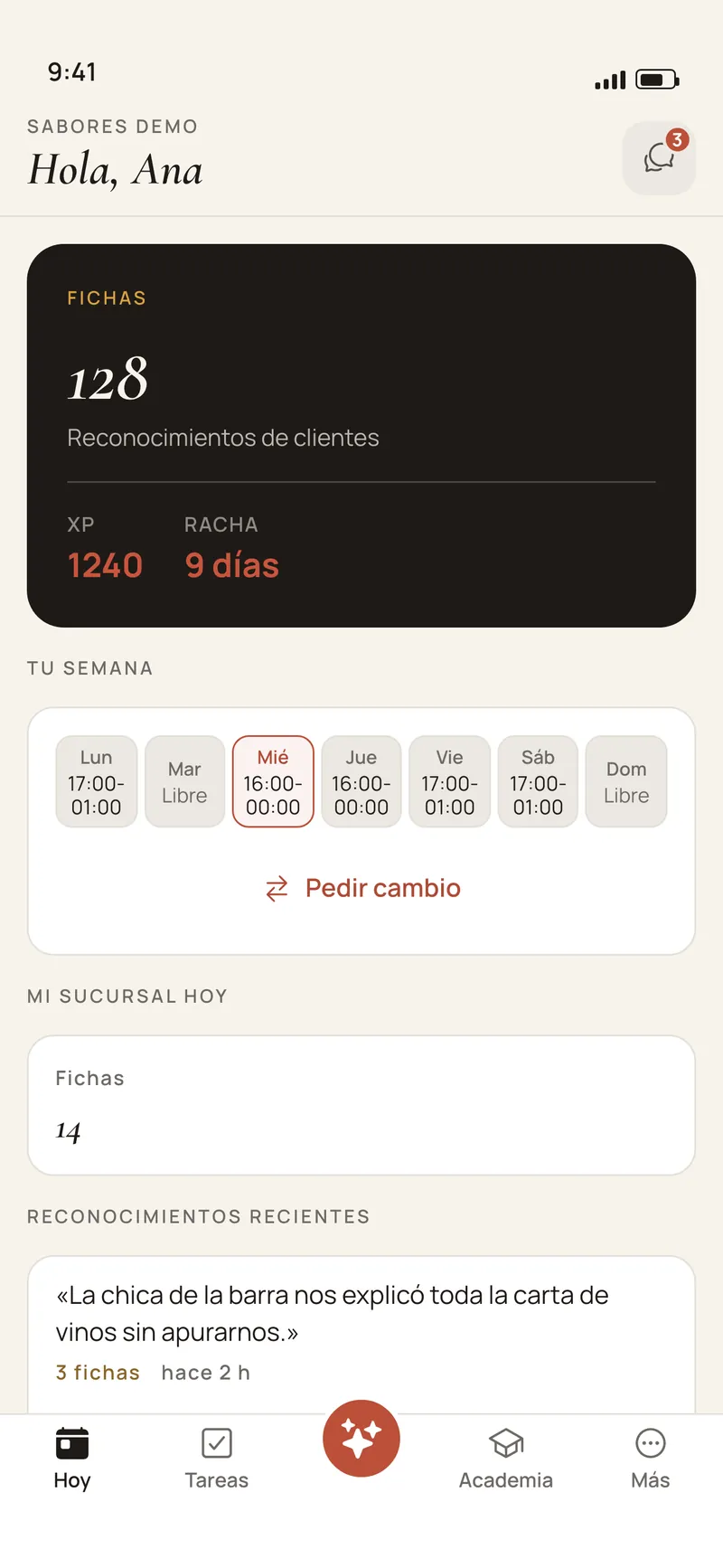
The Premia Teams app Today screen, staff view: their tokens, experience and streak, their week of shifts with the button to ask for a swap, and recent recognitions
Today · Premia Teams app · screen composed from the app’s code · sample data, Spanish UI

How it is supervised today

Photos in a WhatsApp group, paper checklists and a manager who knows everything.

  • The proof gets lost in the chat

    The photo of the clean kitchen lands in a group with forty other messages, with no time, no location and no name.

  • A paper checklist raises no alarm

    The opening sheet gets signed every morning and nobody reads it until something goes wrong.

  • Training depends on one person

    Whoever joins learns from whoever is on that day. When your best manager leaves, what they knew leaves too.

  • Several locations, no view

    To know how each location opened you call each manager, one by one.

What it does

Four things your team uses every day.

Communication

The team talks in a place that belongs to the business.

Chats and announcements move out of personal WhatsApp groups and stay with the business when somebody leaves.
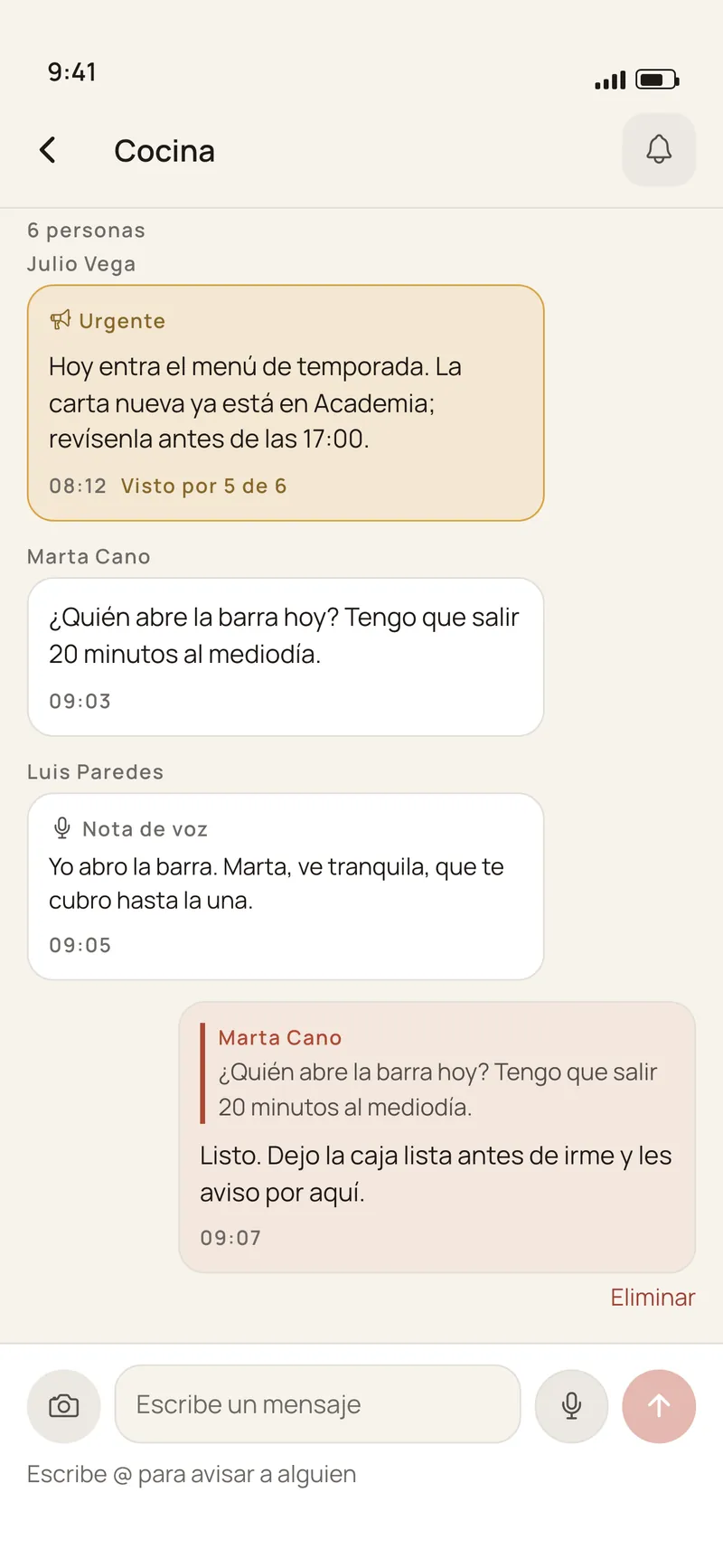
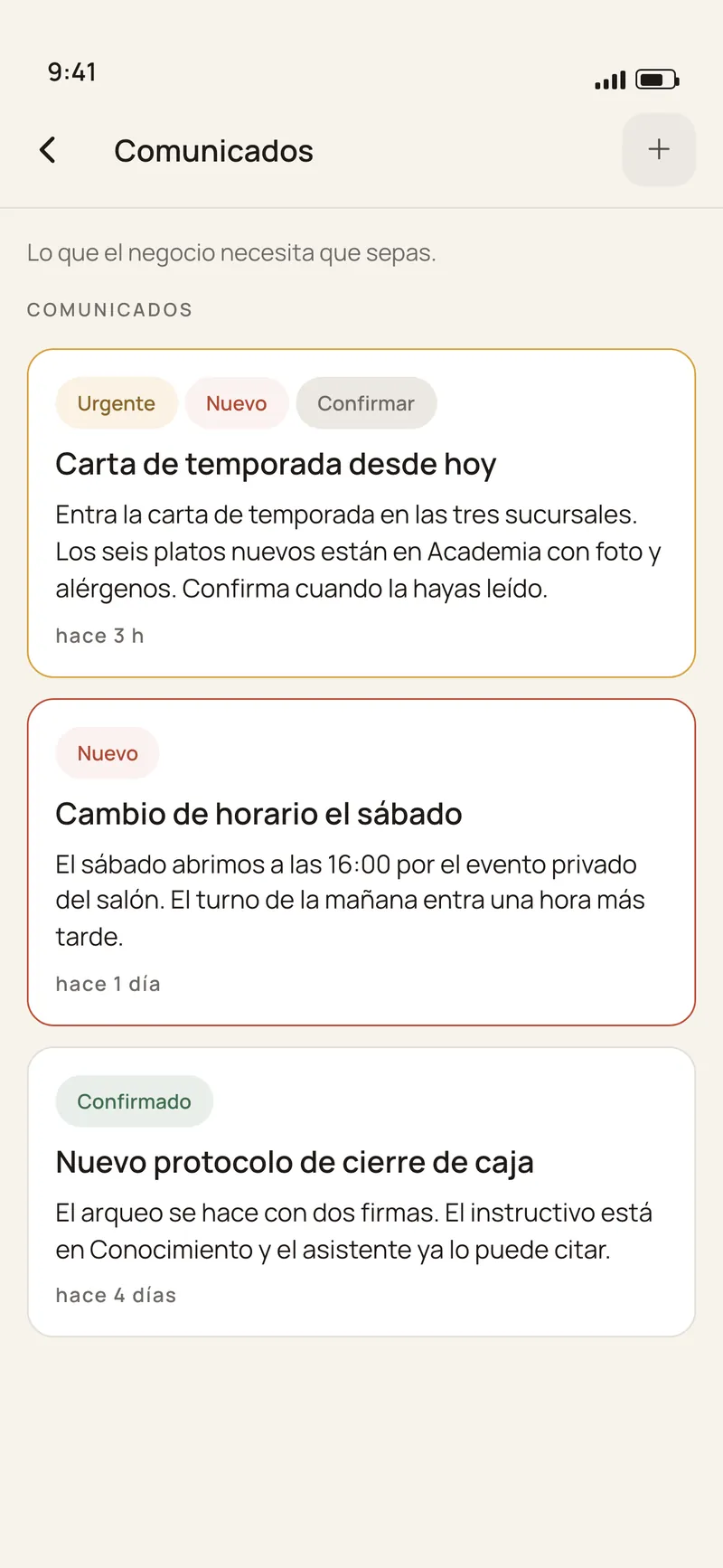
  • Chats per location, per area and in groups, plus direct messages. Voice notes arrive transcribed too.
  • Announcements with confirmation. Management posts once and sees who read it and who did not. Urgent posts arrive even on a muted channel.
  • Quiet hours. Each person sets when they do not want notifications outside their shift.
The Premia Teams app chats screen: location channels, per-area channels and groups
Chats · Premia Teams app · screen composed from the app’s code · sample data, Spanish UI
The Premia Teams app announcements screen: posts from management with read confirmation
Announcements · Premia Teams app · screen composed from the app’s code · sample data, Spanish UI

Operations

Routines that get done with evidence, at every location.

Every location and every station has its list for the day. Each line can ask for the proof it needs, and what could not be done becomes an incident with a deadline.
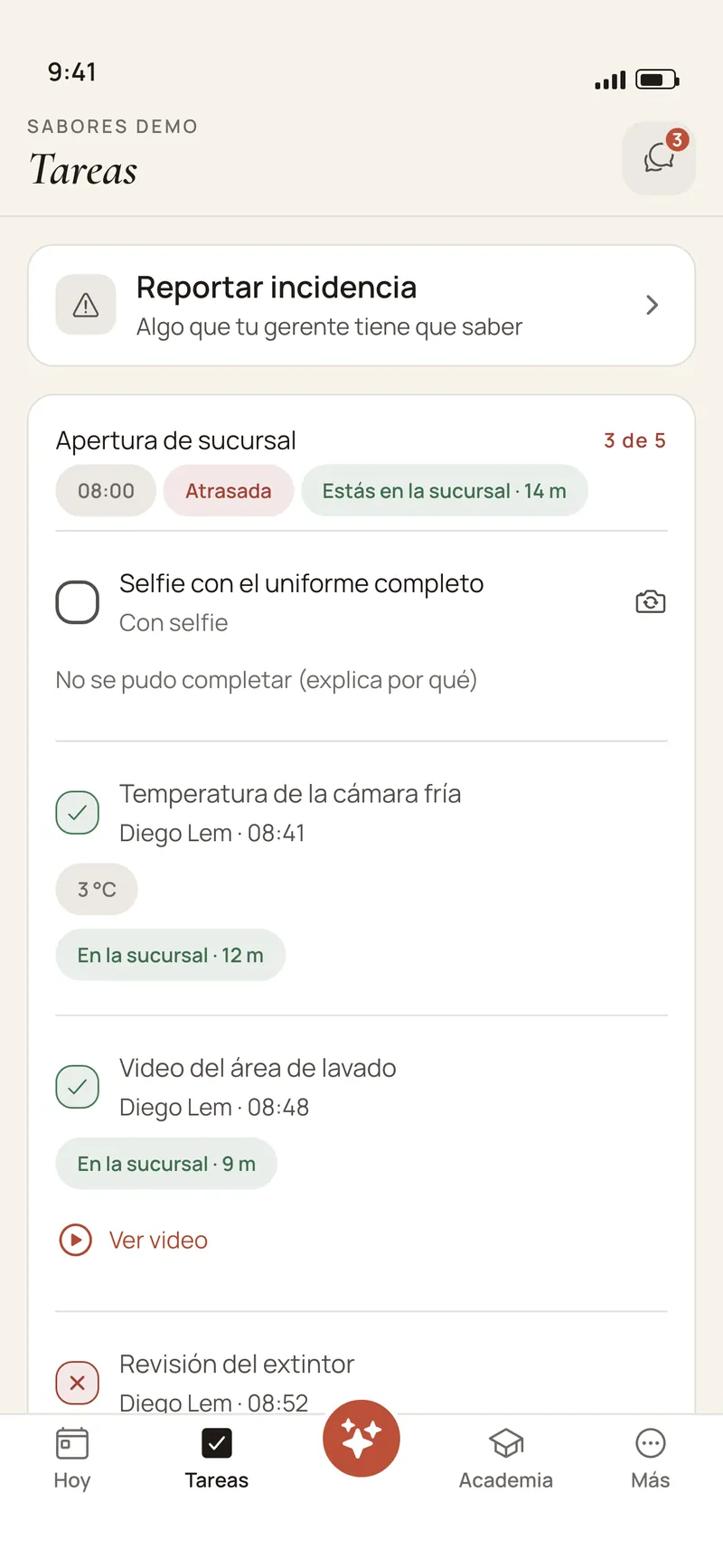
  • Evidence per line: a photo, a selfie, a 15-second video or a number with its range. A temperature out of range is flagged on the spot.
  • Really at the location. A routine can require being at the location: the app confirms where the person is when they tick the line, only at that moment and never in the background.
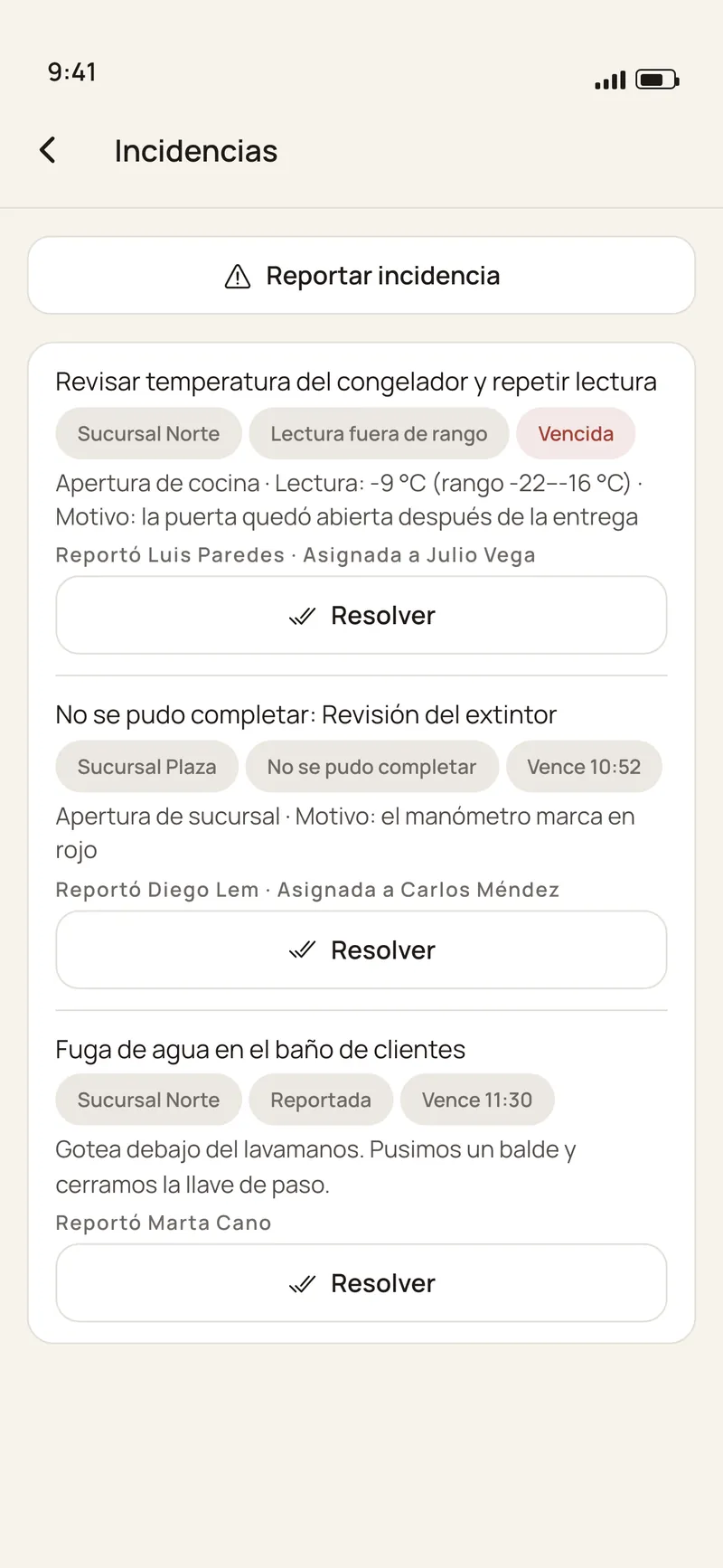
  • «¿Qué pasó?» (what happened?) If a line could not be done, the person says why and an incident opens. Anyone can also report a problem from the floor, with a photo.
  • Incidents with a deadline. They stay open until somebody resolves them with a note. The end of the shift does not close them.
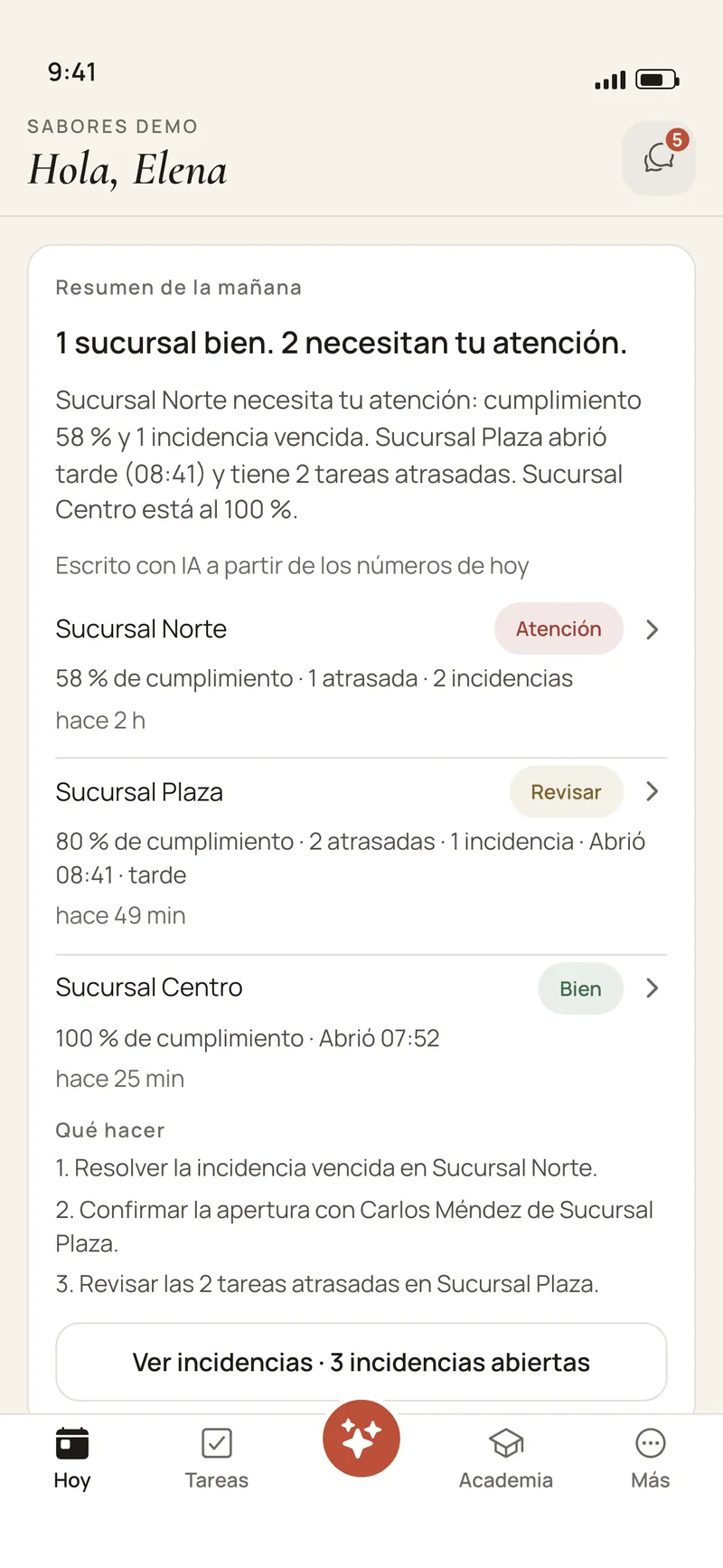
  • Supervision across locations. Completion, overdue routines and incidents per location, and every morning an AI-written summary that can only cite locations and figures that are in your data.
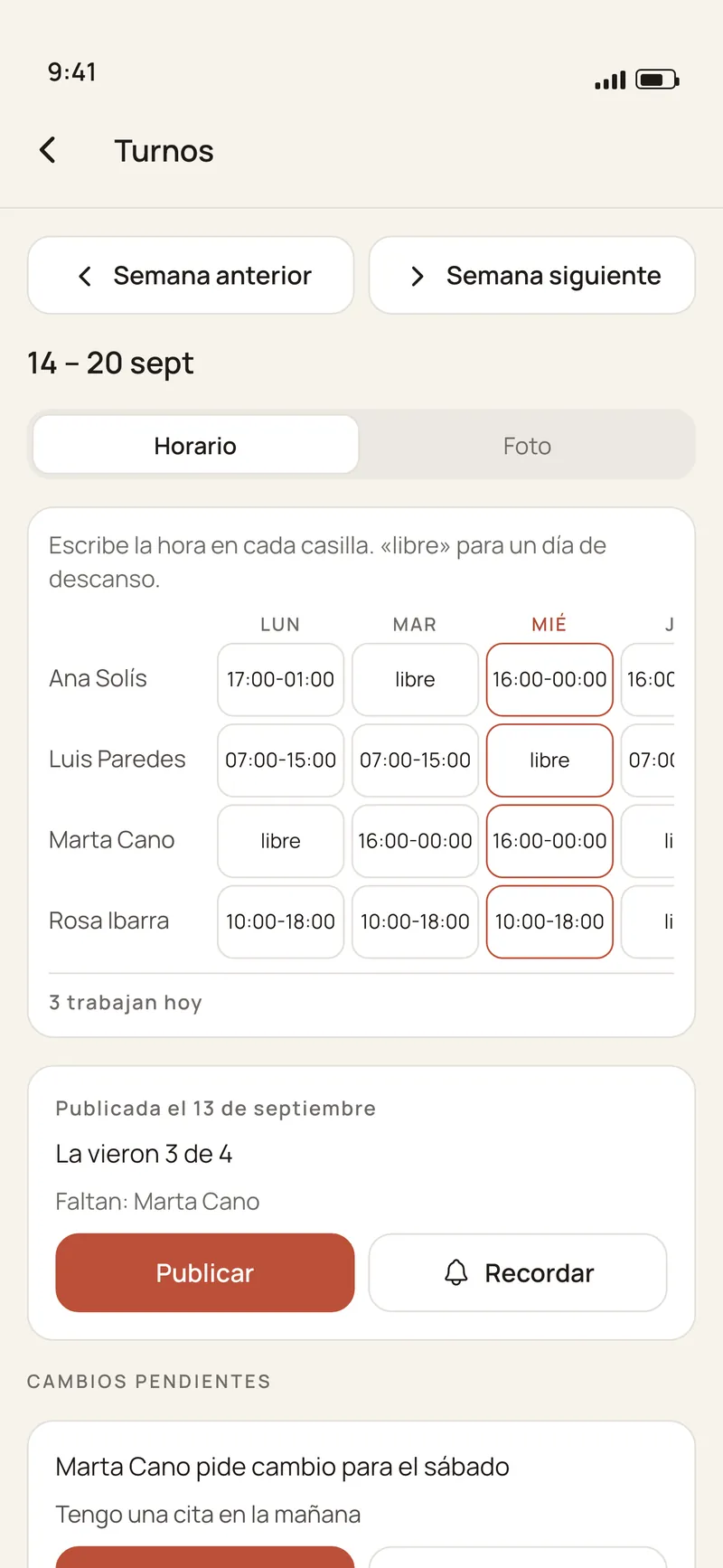
  • Shifts. The week is published once and everyone sees the same one. Each person sees theirs and asks for a swap their manager approves.
A list for the day in the Premia Teams app: a uniform selfie still to take, the walk-in temperature recorded, a video of the washing area, the location confirmed at the branch, and the «No se pudo completar» (could not be done) option
Tasks with evidence · Premia Teams app · screen composed from the app’s code · sample data, Spanish UI
The Premia Teams app incidents screen: an overdue out-of-range reading, a line that could not be done and a leak reported from the floor, each with its location, deadline and assignee
Incidents · Premia Teams app · screen composed from the app’s code · sample data, Spanish UI
Owner view in the Premia Teams app: the AI-written morning summary, the status of three locations with their completion, overdue routines and incidents, and what to do
Morning summary · Premia Teams app · screen composed from the app’s code · sample data, Spanish UI
The Premia Teams app Shifts screen, manager view: the week’s schedule, who has seen it, and a swap request to approve or reject
Shifts · Premia Teams app · screen composed from the app’s code · sample data, Spanish UI

Training

What your best manager knows, for the whole team.

Training stops depending on who is on that day: it is written once, from your own documents, and reaches each person on their phone.
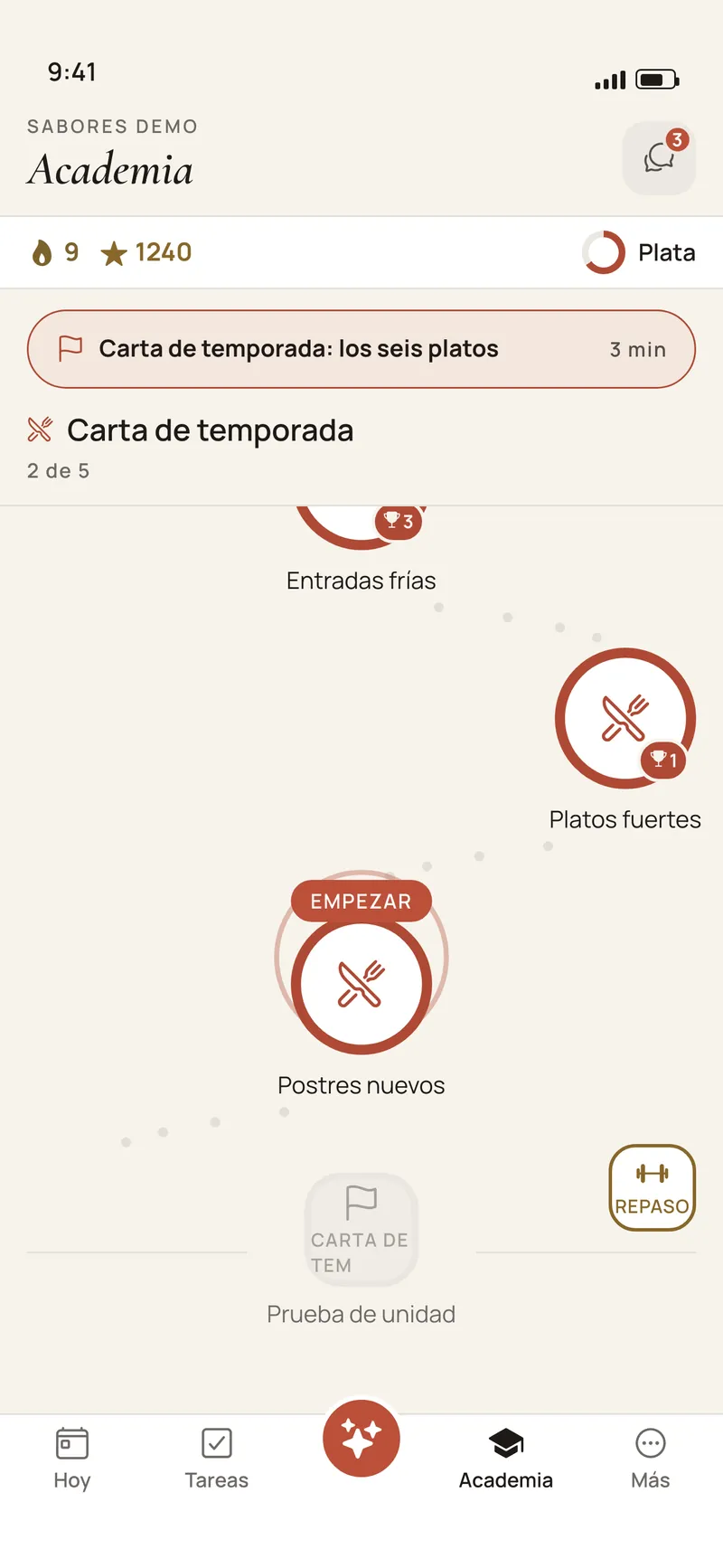
  • Academy. Lessons of a few minutes that Premia writes with AI from your manuals, your procedures and, if you have one, your menu. No question reaches the team until you approve it.
  • First-days onboarding. Every new hire gets a path of steps for their first week, with a buddy to walk them through it, for example the manager of their location.
  • An assistant that knows your manuals. It answers by text or by voice from your documents, citing where the answer comes from. If it does not know, it says so.
The Premia Teams app Academy screen: the path of short lessons, with streak and level
Academy · Premia Teams app · screen composed from the app’s code · sample data, Spanish UI

Recognition

Good work gets seen.

Lessons, reviews and completed routines earn experience points. Each person’s progress is visible to their team.

  • Experience and streaks. Lessons, reviews, routines, onboarding and recognitions all count, with anti-gaming rules and a daily cap on lessons.
  • Badges and a monthly table, per location, to celebrate the people who hold the operation together.
  • If you already use Premia with your guests, the recognition a guest leaves reaches the person who served them, in their app.

The apps

One app for the owner, the manager and the staff.

Premia Teams is an app for iPhone and Android. Each person sees what belongs to their role, and what gets decided at a desk lives in the web console.
  • Staff see their day: their shift, their tasks, the announcements and their lessons.
  • Managers see their location: what is left, what is overdue and the open incidents, and they approve shift swaps.
  • Owners see every location and get the morning summary.
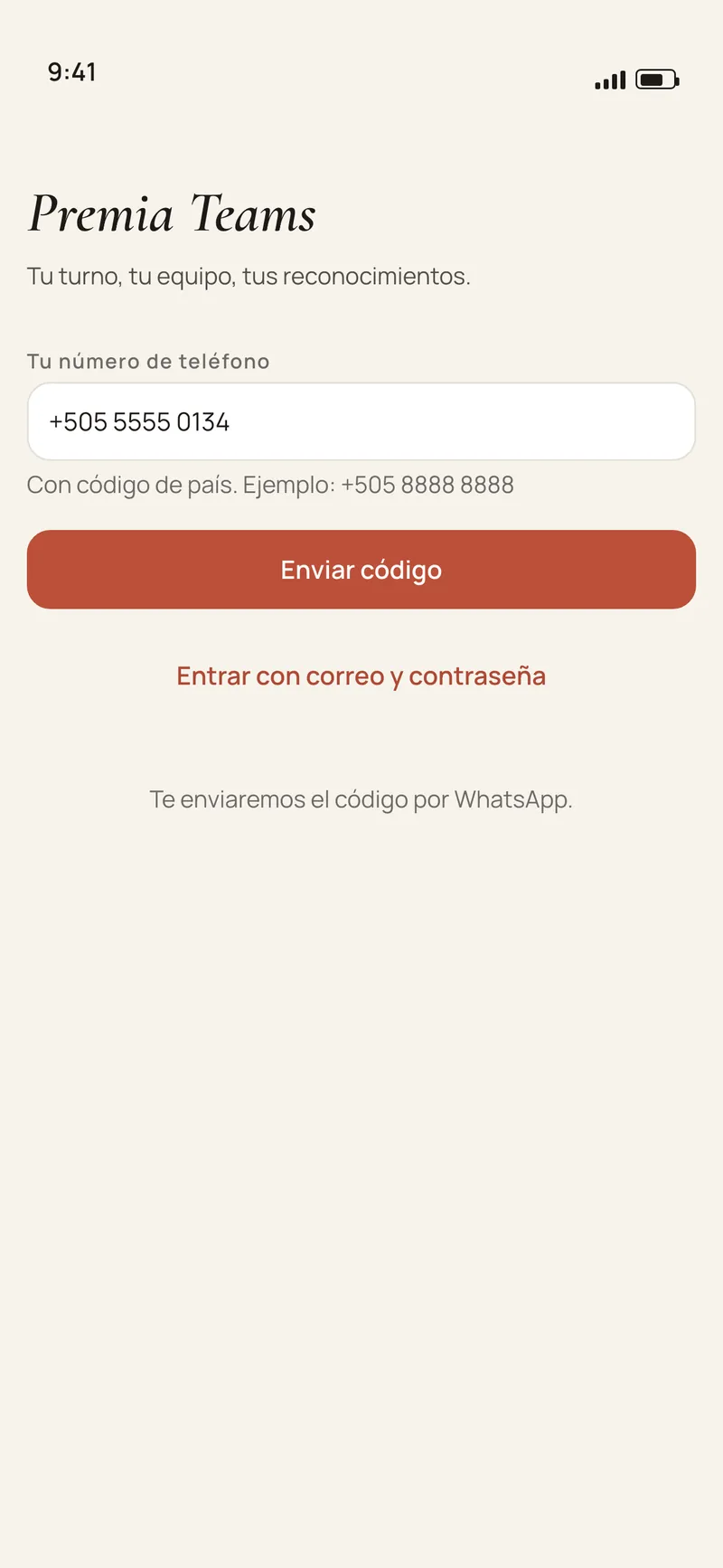
  • Sign-in is the phone number. A code arrives by WhatsApp or SMS. There is no open sign-up and no password: the manager adds each person.
  • No hardware. Everyone uses their own phone.
The Premia Teams app sign-in screen: you sign in with your phone number and a code, no password
Sign in · Premia Teams app · screen composed from the app’s code · sample data, Spanish UI
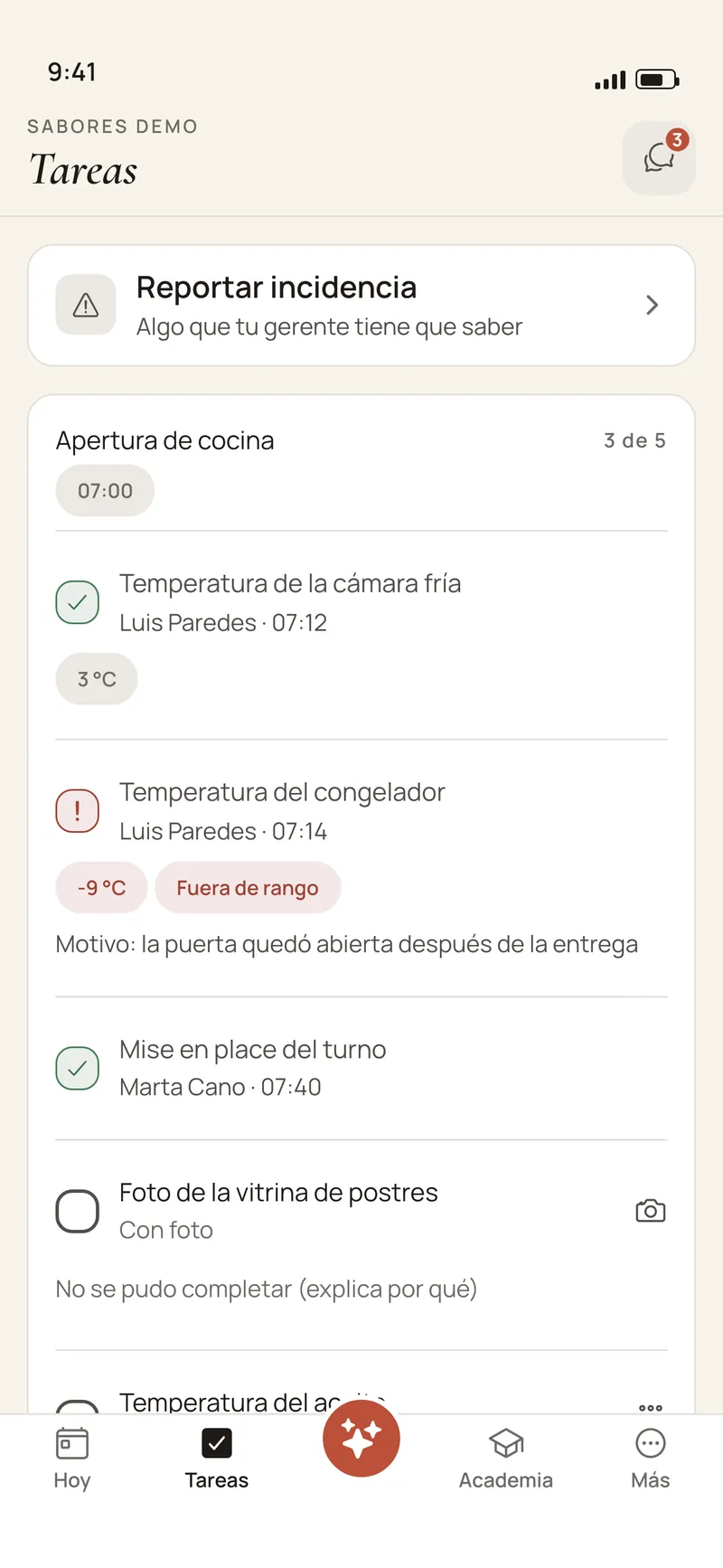
The Premia Teams app Tasks screen: the kitchen opening at 3 of 5, one temperature recorded, another out of range with its reason, and the option to report an incident
Tasks · Premia Teams app · screen composed from the app’s code · sample data, Spanish UI
The Premia Teams app announcements screen: posts from management with read confirmation
Announcements · Premia Teams app · screen composed from the app’s code · sample data, Spanish UI

By sector

For any business with a team that serves.

Each sector finds its stations and routines ready in the library, and changes them or writes its own. What is there today:

  • Restaurants, cafés and bars

    Kitchen opening with temperatures and a photo, the bar set up, closing with the till counted, the new menu in the Academy and the special-night notice with confirmation.

    Routines in the library

    • Kitchen opening
    • Temperatures
    • Bar
    • Close and till

    Stations: Kitchen · Server · Bartender · Cashier

  • Hotels

    The room checked before it is handed over, with a photo at the end; the front desk open before the first guest; notices between shifts and onboarding for housekeeping and bell staff.

    Routines in the library

    • Room check
    • Front desk opening
    • Common areas
    • Pool

    Stations: Housekeeping · Front desk · Bellhop · Concierge

  • Salons and spas

    The salon ready to open with a photo, tool sterilisation recorded every day, the till closed and the protocol for each service in short lessons.

    Routines in the library

    • Salon opening
    • Tool sterilisation
    • Salon close and till
    • Product stock count

    Stations: Stylist · Colorist · Manicurist · Front desk

  • Stores

    The float counted at opening, the cash counted and the point-of-sale report photographed at closing, the main window with a photo and an exit selfie with the store locked.

    Routines in the library

    • Store opening
    • Till close and reconciliation
    • Displays and windows
    • Weekly store stock count

    Stations: Sales associate · Cashier · Stockroom · Floor supervisor · Visual merchandising

  • Service companies

    Cleaning, maintenance and field technicians: mileage and the vehicle checked before leaving, a selfie in protective equipment, the area photographed before and after, and the signed service order.

    Routines in the library

    • Vehicle and equipment checklist
    • Safety and PPE
    • Area cleaning
    • Service handover

    Stations: Technician · Cleaning · Supervisor · Delivery

Is your business not listed? If your team works in shifts and follows procedures, ask us.

Pricing

Per location, with unlimited staff.

Premia Teams

US$59/mo per location · Latin America

US$99/mo per location in the United States

  • Unlimited staff at every location.
  • No one-time setup fee.
  • You do not need to use Premia with your guests.
  • The app for the whole team and the web console.

If you already use Premia

+US$40/mo per brand · Latin America

+US$120/mo per brand in the United States

  • Added to your plan as a module, covering every location of that brand.
  • From the second brand on, 50%.
  • Billed outside Todo incluido.
  • Your guests’ recognition reaches your team’s app.
See all pricing

How you start

No hardware and no blank page.

  1. 1

    A demo with your operation

    A call to understand how your team works today: how many locations, which stations, what gets checked every day.

  2. 2

    Locations and people

    You add your locations and each person with their phone number and station.

  3. 3

    Your first routines

    Activate a routine from the library, start blank, or upload a photo of your paper checklist and Premia turns it into a draft you review.

  4. 4

    Your manuals

    Upload your procedures: the Academy and the assistant work from them, and you approve every question before it is published.

What Premia Teams does not do

Better to know before you sign up than after.

  • It does not clock people in or compute payroll, paid hours or tips.
  • It does not work offline: the app needs internet to send evidence and messages.
  • Shifts are a week you publish: Premia does not build the schedule for you.
  • Location is checked only when completing a line that asks for it, and only against the location’s own address. There is no background tracking.
  • The AI publishes nothing on its own: lessons and their questions wait for your approval.

Frequently asked questions

What is Premia Teams?
It is an app for the team of a business with one or more locations, with a web console for the owner and the managers. It brings together chat, announcements with confirmation, routines with evidence, incidents, shifts, training and recognition. It costs US$59 per location per month in Latin America and US$99 in the United States.
Do I need to use Premia with my guests to buy Premia Teams?
No. Premia Teams is sold on its own, per location. If you already use Premia with your guests, it is added as a module: +US$40 per brand per month in Latin America and +US$120 in the United States, covering every location of that brand.
How many employees can I have?
As many as you need. Premia Teams is priced per location and staff is unlimited.
Does it work without internet?
No. Today the app needs a connection to send evidence, messages and answers. With no signal it says so, and the person tries again when they have one.
Does it track attendance or payroll?
No. Premia Teams is not a time clock or a payroll system: it does not clock people in, compute paid hours or split tips. Shifts are the week you publish and the swaps you approve.
What does my team need to use it?
An iPhone or an Android phone. The manager adds each person with their number, and the person signs in with a code sent by WhatsApp or SMS. There are no passwords.
Can I see all my locations at once?
Yes. The console shows completion, overdue routines and incidents for every location, and every morning the owner gets a summary. A manager sees only the locations assigned to them.
What does the AI do, and what does it not do?
It drafts lessons from your documents, which you approve; answers questions citing your manuals; turns a photo of a paper checklist into a draft; and writes the morning summary, which can only cite locations and figures from your data. It publishes nothing on its own.
Which languages is it in?
The app and the console are in Spanish and English. In the app, each person picks their language in their profile.

Let us look at your operation in thirty minutes.

We show you Premia Teams with your locations, your stations and a real routine from your business.