
Appointments and loyalty for salons · LATAM
Your calendar in order and your clients coming back
in one place.
Premia Citas keeps each stylist’s calendar: your reception books, your client books on her own from your page or messages Mia on WhatsApp, and the confirmation and the reminder go out on their own. When you mark the appointment “Attended”, the visit counts toward her points, with no receipt and no QR. And along the way she can thank whoever did the work — her stylist, colorist or manicurist — with a Premia Token.
WhatsApp · iOS/Android app · Web portal · Apple & Google Wallet

Mia books on WhatsApp
One message. Appointment booked.
Your client writes in her own words and Mia, Premia’s assistant, finds her stylist’s free times, repeats the service, the day and the time back, and books only once she says yes. The appointment lands in the same calendar your reception uses, with no overlaps. She can also move or cancel it in the chat or from her link, up to two hours before.
- Move or cancel up to
- 2 h before
- Cost / brand · mo
- from US$79
- Premia Citas
- Included
Premia Citas · included for salons
Every stylist’s calendar, no overlaps, fewer calls.
Reception books a person for a service: the length comes from the service, and each stylist has their own hours and days off. Your chairs or rooms set how many clients you see at once, and the calendar will not let two appointments overlap. Premia takes no payment: your client pays at your salon, as always.
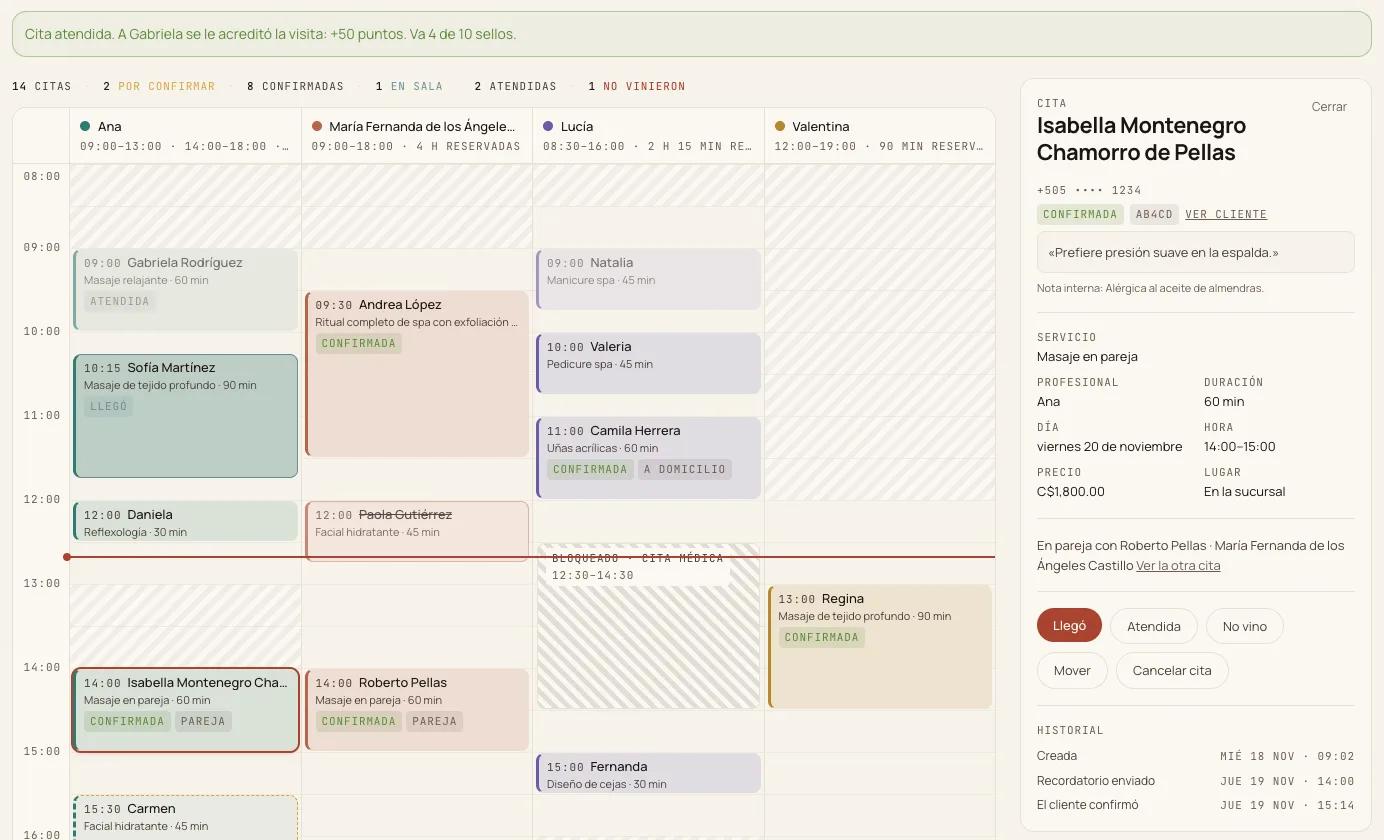
A calendar per stylist
The day in columns, one per professional, and it updates itself. Find a client by name or phone, message or call her from the appointment, and “Book again” repeats the service and the stylist.
Online booking
From your Premia page: service, stylist or “anyone”, day and time, and a WhatsApp code to confirm. For one person or for two.
Mia on WhatsApp
She books, moves and cancels appointments in the chat, and writes nothing down until the client says yes.
Confirmation and reminder
They go out on WhatsApp. The client replies CONFIRM or CANCEL, and can move or cancel from her link up to two hours before.
“My appointments” in Premia Teams
Each stylist sees their day in the Premia Teams app. You see each professional’s commissions in a report.
Your clients, with their note
A private note per client — allergies, preferences — that only your team sees. And you bring your clients and upcoming appointments from a CSV or Excel file from the system you use today.
How it works
From the appointment to the points.
No POS change, and the app is optional for the client. From the booking to the credited visit, in four steps.
- 01
They book
On your page, on WhatsApp with Mia, or at reception.
- 02
The reminder arrives
On WhatsApp; they reply to confirm or cancel.
- 03
You mark “Attended”
From the calendar, when the service is done.
- 04
The visit is credited
Points or a stamp, on its own, with no QR or receipt.
No friction
More than one way to earn.
With Premia Citas, the visit counts on its own when you mark the appointment “Attended”. A client who walks in without one earns too. You set the rules, and it all lives on WhatsApp, the iOS/Android app, the web portal and the phone wallet.
Attended appointment
When the service is done, reception marks the appointment “Attended” and the visit is credited on its own: points or a stamp, once a day. No QR, no receipt.
QR scan with location
For the client who walks in without an appointment: she scans reception’s signed QR and the location confirms the visit is real.
Photo of the receipt
If you would rather reward by amount, the AI reads the receipt total and credits the points. It is an option, not a required step.
Your Salon
Services · points per visit
- Full color+240 pts
- Cut and style+90 pts
- Keratin treatment+180 pts
Thank you, Camila — colorist
Your client sent a Premia Token to whoever served her.
Services and recognition
Reward what repeats, recognize who does it.
The color every month, the cut every six weeks, the treatment each season: those returning services are your business. Premia rewards them by amount or by service — you set the rule — and lets your client thank her stylist by role. Recognizing the team is not a promise: the Premia Token by role (stylist, colorist, manicurist, reception) already ships and runs in production.
- Typical rule
- Points or a stamp per attended appointment (configurable)
- Recognition
- Premia Token to the stylist, by role
- Identity
- Verified WhatsApp number
- Where it lives
- WhatsApp + Apple Wallet + Google Pay
No friction
You mark the appointment “Attended” and Premia credits the visit on its own —your team touches nothing at the till.
- App optional
- WhatsApp + Wallet
- Premia Citas
- Included
- POS-agnostic
- Yes
Get started
From first demo to first service earned, one week.
You don't change tills, you don't change WhatsApp, you don't sign long contracts. We walk you through every step — you launch when your salon is ready.
- Step 01
30-minute demo
We walk through what it would look like with your brand, your services and your points rule. No commitment.
Day 1
- Step 02
We set up your account
You get a panel with your theme, your WhatsApp number, and your list of roles for recognition.
Days 2–3
- Step 03
We load your calendar and rewards
We upload your services with their length and each stylist’s hours, bring in your clients and upcoming appointments from a CSV or Excel file, and set the points or stamps per visit.
Days 4–5
- Step 04
You launch with your team
1-hour training for reception and stylists, and your appointments page opens for online booking.
Day 7
How much does it cost?
From US$79 a month per brand, plus US$30 for each additional location. We charge nothing per enrolled customer and take no commission on your sales.
FAQ
What salon owners always ask us.
If your question isn't here, just write us — we reply personally the same day.
Send us your questionDo my clients need to download an app?
No. They book from your page, in the browser, or on WhatsApp, which they already have. Their phone number is their identity: they confirm with a WhatsApp code, and every attended appointment earns on its own.
Does it replace my booking system?
It can. Premia Citas is the per-professional calendar, with online booking, Mia on WhatsApp and reminders, and you bring your clients and upcoming appointments from a CSV or Excel file from the system you use today. It takes no payments and no deposits: your client pays you at the salon, as always, and your till does not change.
How does stylist recognition work?
After a service, the client can send a Premia Token to the person who served her, chosen by role: stylist, colorist, manicurist or reception. It is a shipped, running feature — you load your team by role and every token is logged so you can see who your clients are recognizing.
Who owns my client data?
You do. The business is responsible for its customers’ data and Premia processes it on the business’s behalf. If a customer asks us to delete them, we do. The details are in the privacy policy.
What is the real monthly cost?
From US$79 a month per brand, plus US$30 for each additional location. For salons, Premia Citas is included at no extra cost. We charge nothing per enrolled customer and take no commission on your sales. The plans, the modules and the message packs are on the pricing page.
Ready to try it
Let's talk about your salon (by email or WhatsApp)
We'll show you how your calendar, your appointments page and your points program would look with your brand. No 40-slide deck, no salesperson — you talk directly to the team that builds the product.
hello@premia.vip · Response time: under 24 hours